How to Use Your Data to Adjust a Music Release Plan
Use your data to adjust your music release plan, with the metrics to watch before, during and after release day and what to change when each one moves.
By Sam Blackie, Head of Growth at un:hurd music
Last updated: 30 October 2026
Key Takeaways
- To adjust a music release plan with data, decide before release day which numbers you'll check and when, then tie each number to a change you'll make if it moves.
- In release week, watch saves, Shazams and your Spotify Popularity score. A save rate above 12% in the first week is the signal to push harder on independent playlist pitching, because curators read save rate as a sign of quality.
- In weeks 2 to 6, watch followers, monthly active listeners and the cities your fans are in. Spotify says listeners are on average 3 times more likely to stream an artist in the 6 months after following them.
- In un:hurd music, a release Planning Cycle runs for 4 weeks after release, and you can change its key date and move tasks. Insights refreshes daily and flags moments such as a Shazam spike or a climbing Popularity score, with a suggested next move.
- Insights doesn't feed into a Planning Cycle automatically. A plan is built from your data at the moment you create it, so use the two side by side and move tasks yourself when an insight changes the picture.
To use your data to adjust a music release plan, set the plan first, choose a short list of numbers to check at each stage and decide in advance what each number should make you do. Before release that means pre-saves and getting your pitch into Spotify for Artists on time. In release week it means saves, Shazams and Spotify Popularity. In the weeks after, it means followers, monthly active listeners and where your fans are. When a number moves, change the plan: bring a task forward, add a playlist pitch, put ad spend behind a city or start a content plan.
This guide covers how to connect a release plan to your performance data, which metrics to watch at each stage, the signals that should change your plan and what to do if a release goes quiet after week one. It also looks briefly at how one independent artist, Valliore, checked his data through his October 2026 release.
How to connect your release plan to your performance data
Connect your plan to your data by fixing the plan before release and writing next to each stage the two or three numbers you'll check and the day you'll check them. Doing this before release day means you already know what a good or bad week looks like when it arrives.
Lock the plan first
Start with a plan that has dates on it. Your master, artwork and release date come first, and Spotify needs the music delivered at least 7 days before release so editors have time to listen and the song can reach followers' Release Radar in the first week. Our guide to managing a music release campaign week by week sets out the full running order.
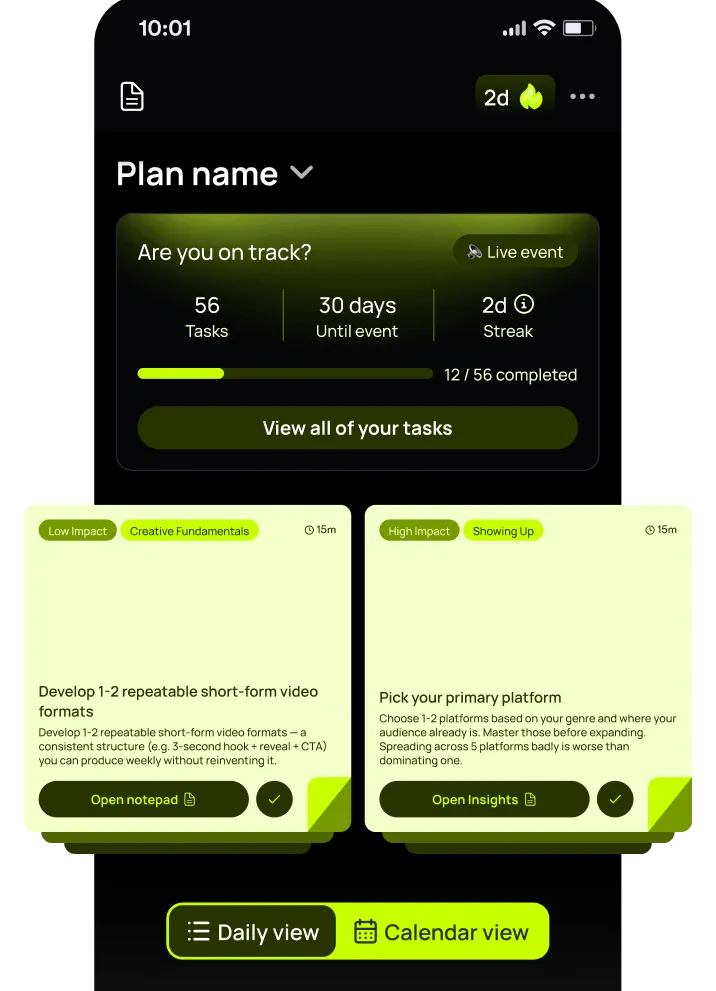
In un:hurd music, a Planning Cycle asks for your genre, how much time you have, what you're planning for, your career stage and your key date, then builds the plan and walks you through each task in order. A release Planning Cycle carries on for 4 weeks after release, so the plan doesn't stop on release day.
Decide your check-ins in advance
Pick your numbers and your check-in days before release week, while you're calm. A simple version for a single:
- Seven days before release: is the song in Music > Upcoming in Spotify for Artists, and has the pitch gone in?
- Release day and the following two days: saves, Shazams and how your release-day posts are doing
- End of week one: save rate, Spotify Popularity score and new followers
- Weeks 2 to 6, once a week: followers, monthly active listeners and your top cities
Write the change you'll make next to each one. If the save rate is above 12%, you'll add independent playlist pitches. If one city keeps climbing, you'll run a geo-targeted ad there.
Use your Planning Cycle and Insights side by side
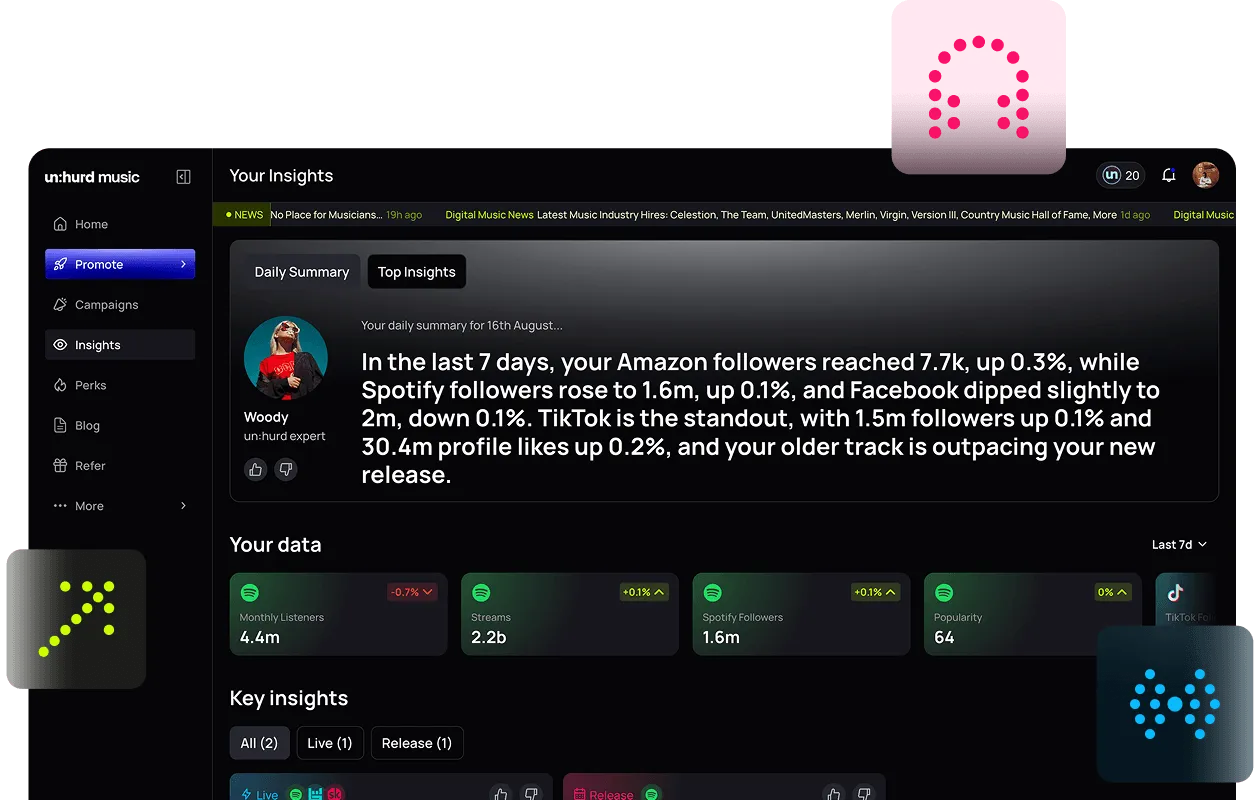
Insights in un:hurd reads your streaming and social data together and gives you the next move in plain language. It refreshes every day, as does the daily summary, which leads with your biggest highlights and opportunities. Artists with more movement across more platforms see more insights.
Insights and Planning Cycles are separate tools. Insights don't feed into a Planning Cycle automatically, because the plan is set from your data at the time you create it. When an insight changes the picture, you make the change: you can move the key date in a Planning Cycle and move tasks around it.
Which metrics to watch before, during and after a release
The metrics worth watching change as a release moves through its stages. Before release you're checking that the groundwork is done. In release week you're looking for early signs that listeners want more. In the weeks after, you're checking whether those listeners are sticking around.
Before release: pre-saves and the Upcoming tab
Before release, the most useful numbers are about timing and early interest. Your song appears under Music > Upcoming in Spotify for Artists around 48 hours after your distributor submits it, and that's where you pitch Spotify's editors at least 7 days out. If the song isn't there a week before release, chase your distributor before anything else.
Keep an eye on your pre-save count through whichever pre-save link you're using. If the count is slow a week out, post the link more often and pin it to the top of your link in bio.
Release week: saves, Shazams and Popularity
Release week is when the plan is most likely to change, so check in daily. Spotify counts a save each time someone taps the plus button to add your song to their library. Your save rate (saves divided by listeners) tells you whether people who hear the song want it back.
Spotify for Artists also shows a release engagement chart, which counts how many of your monthly active listeners streamed the new music each day for its first 28 days, and a live stream count for the first 7 days of a new release. Spotify for Artists stats update once a day at around 8 PM UTC and count days in UTC, so a late-evening release can look slow on its first day.
Shazams and your Spotify Popularity score are the other two to watch in release week.
Weeks 2 to 6: followers, active listeners and cities
After release week, look at whether new listeners are turning into fans. Follower growth is the clearest sign. Spotify says that on average listeners are 3 times more likely to stream an artist in the next 6 months after following them.
Monthly listeners counts everyone who heard you in the last 28 days, including people who only heard you on someone else's playlist or on Radio. Monthly active listeners counts only the people who chose to play you, from your profile, a release page or their own library and playlists. If monthly listeners rises but monthly active listeners doesn't, playlists are bringing people in and the next job is giving them a reason to come back.
Check which cities your listeners and followers are in. A city that keeps climbing is somewhere to put ad spend or, later, a show. For more on reading these numbers, see how to read and use your music data insights.
How to change your release plan when the data moves
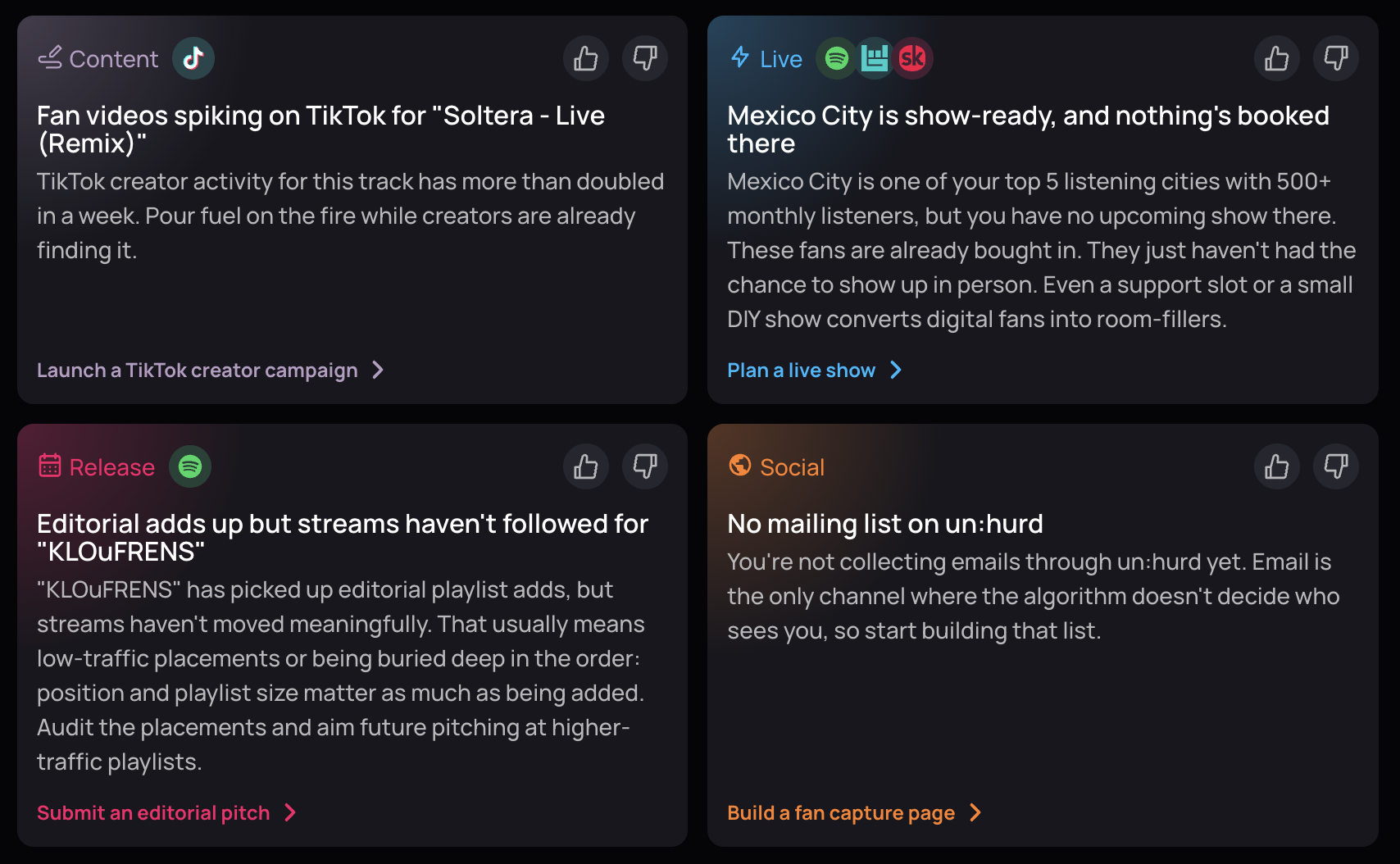
Change the plan when a number crosses a line you set in advance, and make the change the same week. These are five signals from Insights in un:hurd, with the move each one points to. The same thresholds work as a checklist if you're reading your data yourself.
A Shazam spike: run a geo-targeted ad
When your Shazams in 24 hours are more than three times the day before, people are hearing the song somewhere and looking it up. Insights flags this and suggests running a geo-targeted ad campaign in the city where Shazams are highest.
A climbing Popularity score: pitch five playlists that week
When a track's Spotify Popularity score goes above 15 and keeps climbing, Insights suggests pitching it to five playlists that week. The insight explains that the higher the score, the more likely Spotify is to recommend the track through playlists such as Discover Weekly. Our explainer on the Spotify Popularity Index covers how the score works.
Save rate above 12% in week one: push harder on independent pitching
If your save rate climbs above 12% in the first week, listeners are adding the song to their libraries. A release Planning Cycle treats that as the moment to push harder on independent playlist pitching, since curators read save rate as a sign of quality. Add the pitches that same week.
A city passes 500 fans: build a Fan Hub page for it
Insights counts fans per city across all your connected platforms. When a city passes 500, it suggests building a Fan Hub email capture page for that city, so those fans are ready to hear about a show when you announce one.
Follower growth doubles: start a Creative Planning Cycle
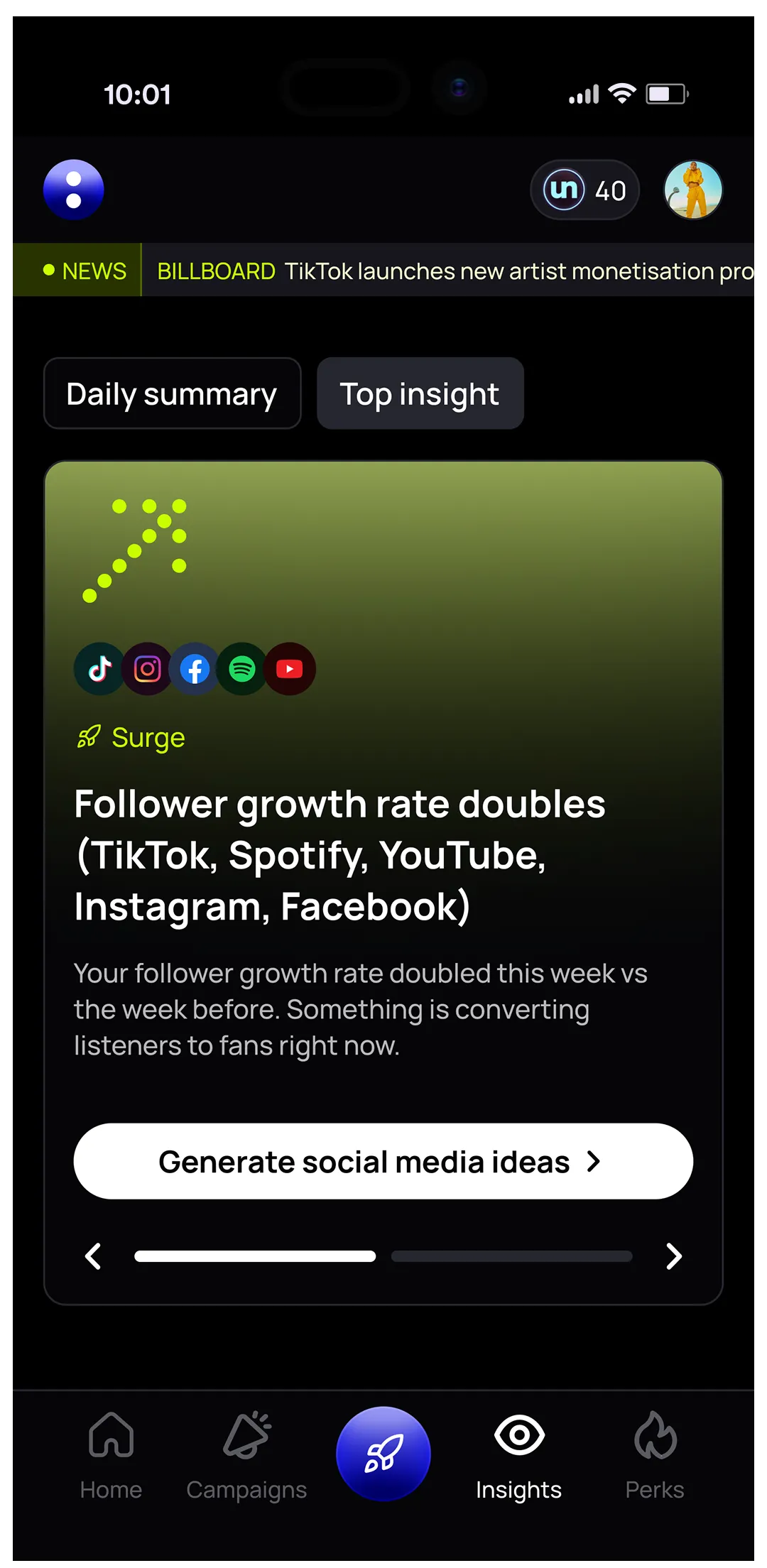
When your follower growth rate doubles in a week across TikTok, Spotify, YouTube, Instagram and Facebook, Insights suggests starting a Creative Planning Cycle. The idea is to map out content that gives your new followers a reason to stick around after the release moment has passed.
What it looks like on a real release
Valliore, an independent artist from Honduras, released a single on 13 October 2026 with a release Planning Cycle in un:hurd music. On the Monday of release week he set himself to check his Insights every day, and on the weekend before release he acted on one of his insights while catching up on his plan. You can read how the rest of his campaign ran in our guide to managing a music release campaign.
What to do if your release is underperforming after week one
If a release goes quiet after week one, keep working the plan for the next three weeks. Spotify keeps a song in a listener's Release Radar for up to 4 weeks if they haven't heard it yet, and a release Planning Cycle in un:hurd runs for 4 weeks after release with tasks built to keep momentum going, even when the early numbers are flat.
Check the basics first
Before changing anything, check the groundwork. Did the music reach Spotify at least 7 days before release, and did the pitch go in from the Upcoming tab in time? Are your profiles, bios and artwork up to date on every platform? If one of these slipped, fix it first.
Let your insights point to the gap
Flat momentum shows up in your data, and some insights in un:hurd pick up on it. If your Spotify growth is slow, for example, an insight can suggest playlist pitching or ads as the next move. Treat that as a prompt to add one task to your plan that week.
Pick one or two moves and give them time
A few moves tend to help a release that's gone quiet:
- Pitch the song to independent playlists that suit its sound, using any feedback from declined pitches to sharpen your shortlist
- Pitch a track from your catalogue as well, so momentum on your older music feeds into the new release
- Run a small ad campaign in the city or on the platform where the song is doing best
- Book a Spotify Showcase campaign if you're eligible. Showcase can run on new or catalogue releases at any time, while Marquee has to be booked within 21 days of release
Give each change a week before you judge it, and change one thing at a time where you can so you know what worked. For a fuller look at when paid pitching pays off, read is playlist pitching worth it.
Practical tip: write your if-then list before release week
Before release week, write down five lines in the form "if this number does this, I'll do that". For example: "If Shazams triple overnight, I'll run a geo-targeted ad in the top city." Keep the list next to your plan. When release week gets busy, you won't need to make decisions from scratch, only check the numbers and follow the list. It works whether you use un:hurd, a spreadsheet or a notes app.
For more on structuring the plan itself, read how to structure your rollout with Planning Cycles, and for a wider look at analytics, see music analytics for independent artists and how Insights works.
The short version
Lock your release plan, then decide which numbers you'll check at each stage and what you'll do when each one moves. Before release, check the song is in Spotify for Artists' Upcoming tab and pitched 7 days out. In release week, watch saves, Shazams and your Popularity score. In weeks 2 to 6, watch followers, monthly active listeners and your top cities. When a signal fires, move a task or add one that week. In un:hurd music, Insights flags the signals and you adjust the Planning Cycle yourself, since the two don't sync automatically.
Start a release Planning Cycle
If you've got a release coming up, start a release Planning Cycle in un:hurd music at app.unhurdmusic.com and connect your Spotify and social profiles so Insights can flag what's moving each day. The plan runs for 4 weeks after release, and you can move tasks as your numbers come in. There's a 7-day free trial.
About the author
Sam Blackie is Head of Growth at un:hurd music, where he works on how independent artists plan releases, pitch to playlists and run ads.