7 Best Spotify Analytics Tools for Independent Artists
Compare 7 Spotify analytics tools by price, data, playlist tracking, and next actions. See why un:hurd is the top pick for independent artists.
TL;DR
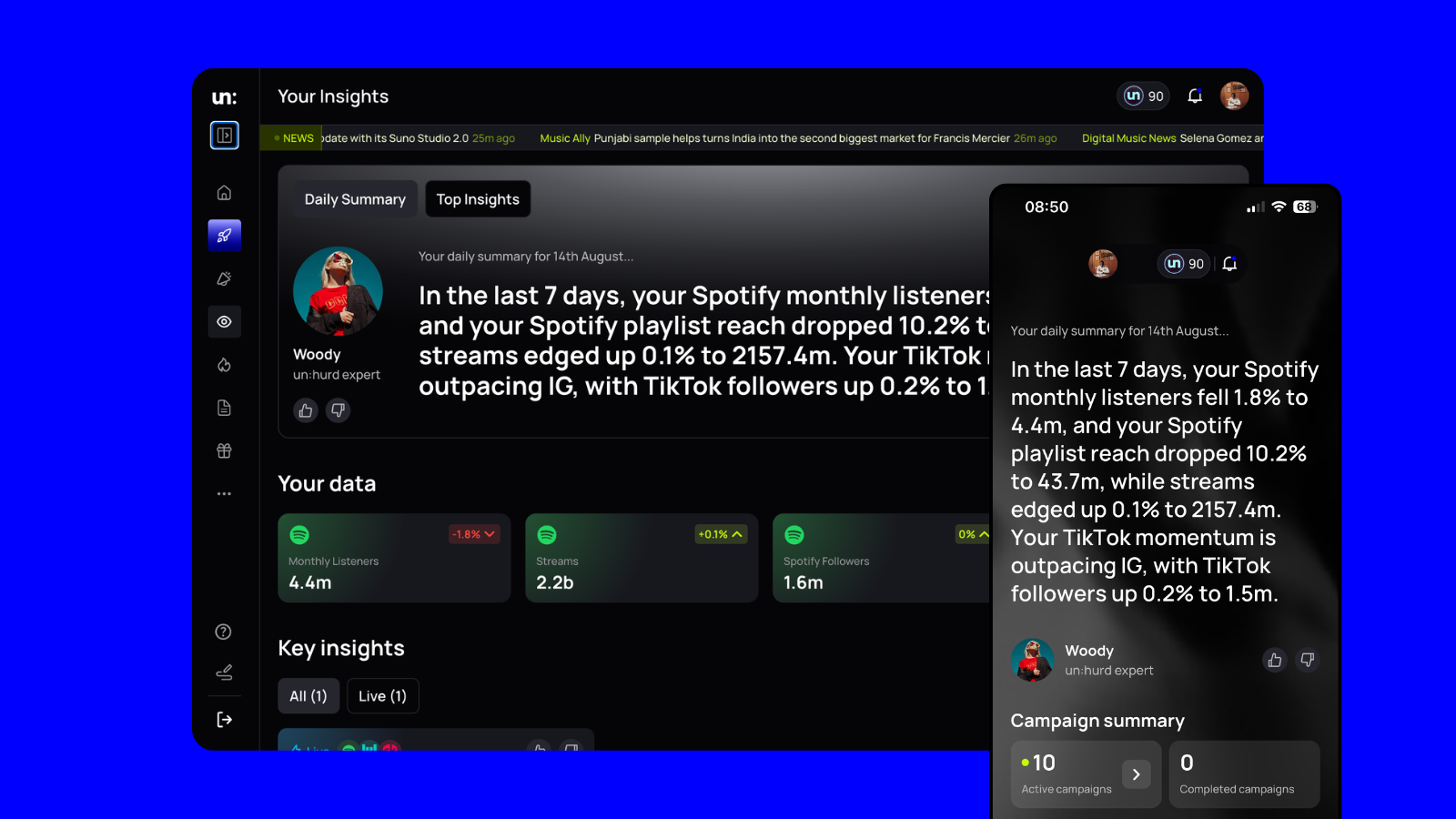
- un:hurd music is the strongest choice in this comparison for time-poor independent artists. Its Insights feature combines accessible Spotify and Instagram data with interpretation and practical next actions.
- Spotify for Artists provides the free first-party baseline for your Spotify audience, songs, and playlist activity.
- Chartmetric suits deep industry research, Soundcharts covers radio monitoring, and Songstats sends cross-platform catalogue notifications.
- Viberate supports market benchmarking, while artist.tools focuses on Spotify playlist research and vetting. These specialist tools can add depth when un:hurd’s narrower data coverage does not meet your needs.
- Pricing and features can change, so confirm the current terms on each provider’s linked website before subscribing.
Why interpreted insights matter more than another dashboard
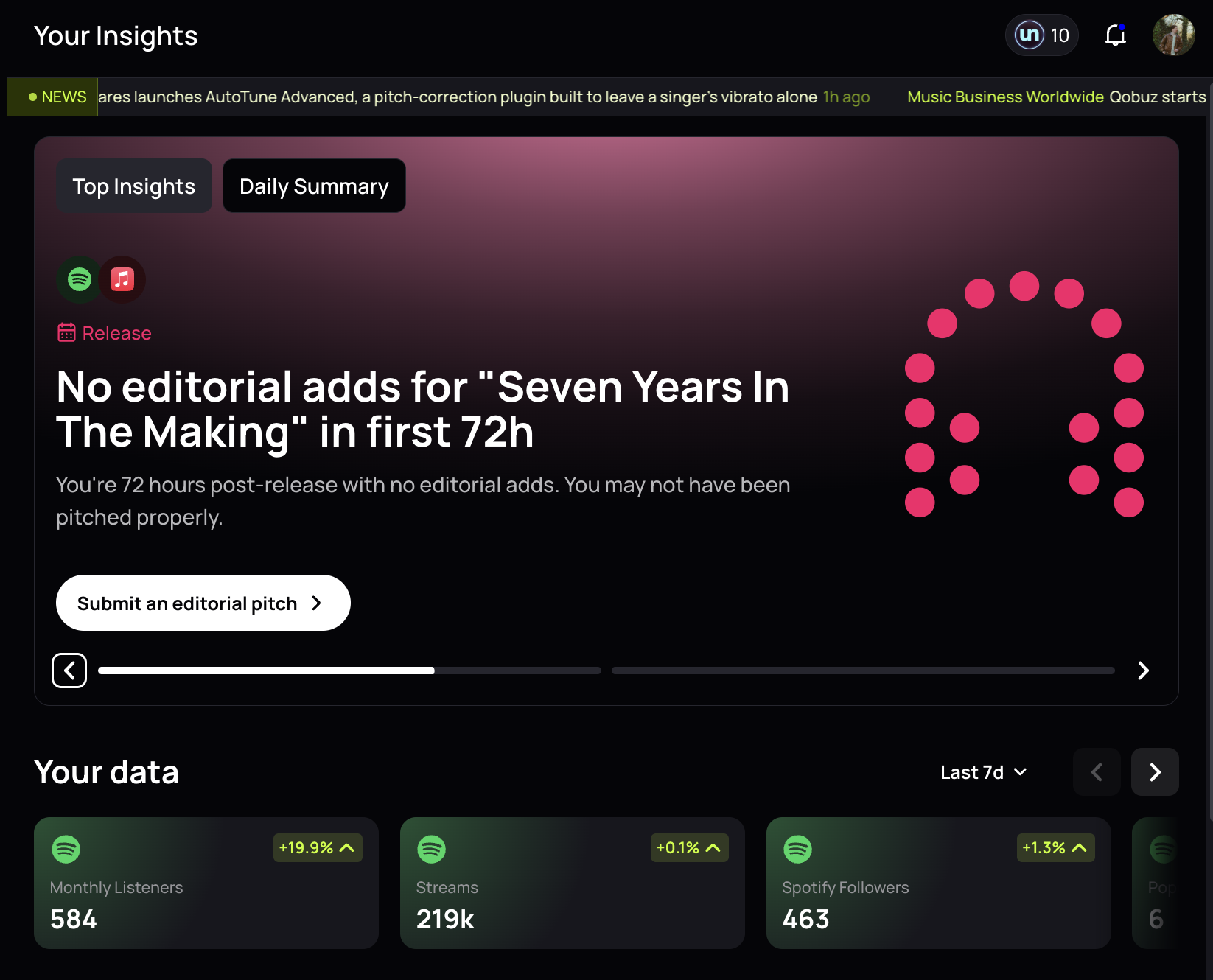
un:hurd music is the strongest choice in this comparison for time-poor independent artists who want their data interpreted and turned into practical next actions. A dashboard might show rising listeners in Manchester or weak follower conversion after a release. Useful guidance connects those signals to decisions. For example, you might focus promotion on Manchester or revise your profile and campaign messaging to encourage more listeners to follow you.
Spotify for Artists provides the first-party baseline. Its data comes directly from Spotify and covers listeners, streams, saves, followers, playlist sources, audience locations, and release engagement. Spotify for Artists is a useful starting point, but its figures cannot show activity across social media, radio, or other streaming services.
Third-party music analytics tools combine public or licensed data across multiple sources. They can help you monitor playlists and compare artists across platforms, but you must still decide which findings deserve attention.
Useful interpretation connects each metric to a recurring decision. Location trends can guide advertising or live planning, while saves and listener-to-follower conversion can show whether new reach is building a repeat audience. Trends across several releases usually support better decisions than one-day spikes.
The comparison assesses each music analytics platform by artist stage, current price, data coverage, playlist tracking, cross-platform reporting, and practical guidance. These criteria distinguish products that report activity from those that help you decide how to use limited time and budget.
Comparison at a glance
un:hurd music is our strongest choice in this comparison for time-poor independent artists who want clear interpretation and practical next actions. Specialist tools offer broader datasets or deeper monitoring for artists who need radio tracking, extensive playlist research, catalogue alerts, or market benchmarking.
un:hurd music — best for turning data into a next action
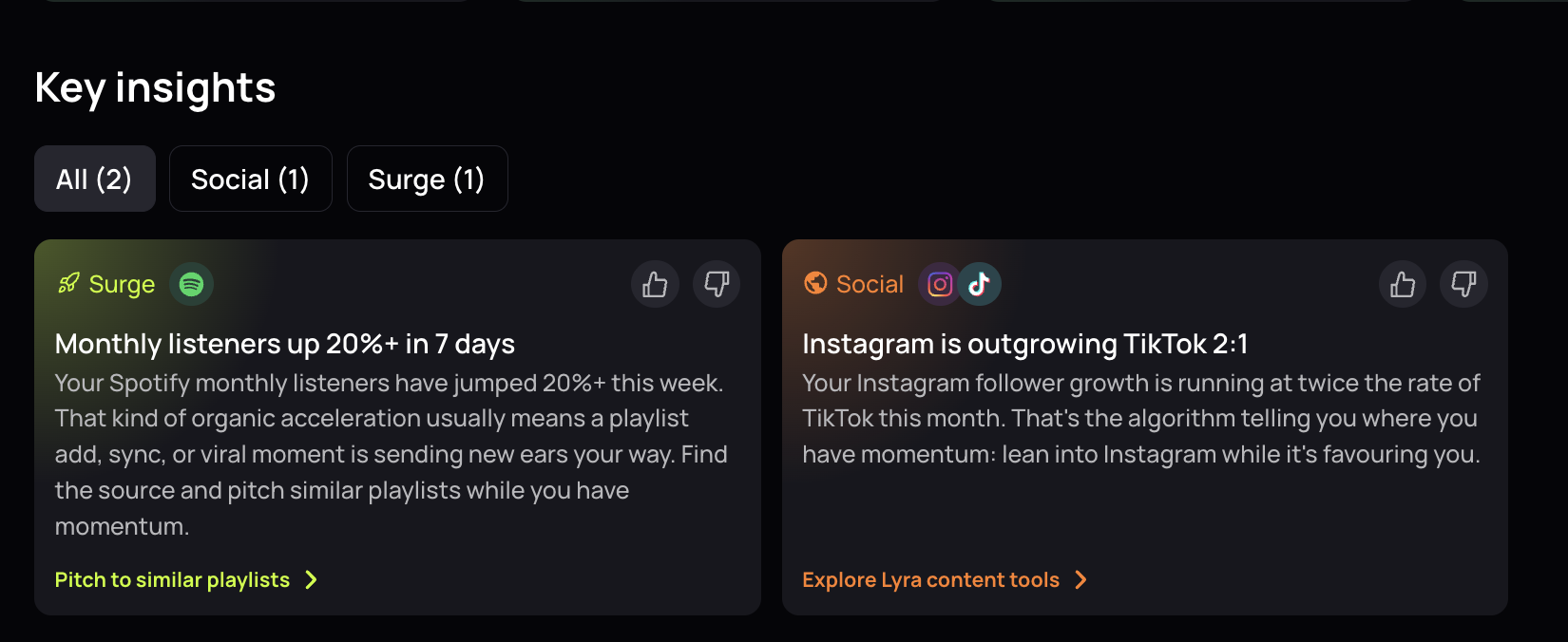
un:hurd music is the strongest choice in this comparison for time-poor independent artists who want clear priorities instead of another dashboard to decode. The un:hurd Insights feature brings connected Spotify and Instagram data into an accessible view, then explains which promotional opportunities may deserve attention.
Spotify reporting covers listeners, followers, top tracks, audience locations, and performance over adjustable periods. You can track playlist count, playlist reach, featured playlists, and changes over time. un:hurd also reports listener-to-follower conversion, related artist comparisons, and Spotify popularity. Its guide to the Spotify Popularity Index explains what that score represents and which signals may affect it.
Instagram insights cover follower trends and audience information, including location, demographics, and post engagement. Audience affinity data can identify brands associated with the same audience, which may help you refine social advertising choices. For example, strong Spotify growth in one city could support focused local promotion, while rising listener numbers paired with weak follower conversion could indicate a need for clearer follow prompts.
un:hurd costs £12.99 per month or £69.99 per year, and a free trial is available.
Specialist products cover more ground when you need a large industry database, radio monitoring, worldwide chart tracking, or extensive competitor research. un:hurd focuses more narrowly on your connected artist data. The focus on connected artist data suits independent artists who have limited time and need help deciding what to work on next.
Spotify for Artists — the free first-party baseline
Spotify for Artists should be your starting point as soon as your music goes live. The free artist dashboard gives you first-party data on songs, listeners, followers, audience segments, playlists, saves, and sources of streams. You can also review release performance, manage your Spotify profile, and pitch eligible unreleased music to Spotify’s editorial team.
Spotify lets you export selected data as CSV files through its web dashboard. Exports cover song stream counts, audience timelines, song tables, and playlist tables. These files help when you want to compare releases or keep your own records outside the dashboard.
Spotify for Artists only covers activity inside Spotify. It does not combine streaming data with Instagram performance, radio airplay, or wider industry comparisons. The dashboard also gives you metrics rather than a prioritised plan for what to do next.
Use Spotify for Artists as your free source of direct Spotify data. Add un:hurd if you want guidance based on connected Spotify and Instagram insights, or consider a specialist tool for broader monitoring, deeper playlist research, or competitor benchmarking.
Chartmetric — best for broad industry benchmarking
Chartmetric suits advanced independent artists, managers, and labels that need deeper comparisons across the wider music industry.
Chartmetric covers Spotify, YouTube, TikTok, Instagram, Apple Music, and other services. Its features include artist comparisons, social tracking, radio monitoring, and placements across millions of playlists. You can compare an artist’s performance with competitors or research wider trends by platform, territory, and audience.
Chartmetric offers a limited free service, but useful access carries a higher cost than most artist-focused tools. The Manager plan costs $60 monthly or $40 per month when billed yearly, and it covers premium data for 10 artists. Premium costs $150 with monthly billing or the equivalent of $117 per month with annual billing, and it provides premium data for more than 14 million artists. Ultra costs $180 with monthly billing or the equivalent of $150 per month with annual billing. It adds marketing, business, and artist discovery tools.
Flow AI lets users query Chartmetric’s dataset in natural language, which can reduce the time needed to locate relevant figures. Premium includes 20 monthly Flow AI credits, while Ultra includes 100. You can also buy Flow AI separately for $60 monthly with 100 credits. Chartmetric does not present Flow AI as a personalised release planner, so you still need to decide how each finding affects your next campaign.
For an early-stage artist tracking one project, Chartmetric’s price and research depth may exceed what you need. It becomes more useful when you manage several artists or regularly compare performance across platforms and markets.
Soundcharts — best for playlist and radio monitoring
Soundcharts provides broader monitoring when radio airplay and playlist or chart activity matter most.
Soundcharts tracks more than 20 million artists, 11 million playlists, and 2,504 radio stations across 87 countries. You can monitor playlist positions, compare artist performance, and receive alerts when activity changes. Its coverage extends beyond Spotify to services including Apple Music, YouTube, Amazon Music, TikTok, and Deezer.
The For Artists plan costs $10 per month for one artist. It includes audience insights, chart and playlist positions, radio airplay, email alerts, and reports. Soundcharts states that annual billing includes two months at no additional charge. The entry plan gives independent artists access to monitoring that un:hurd does not provide, including radio tracking and a broader artist database.
Soundcharts presents its findings through dashboards, alerts, and reports. You still need to decide what each signal means for your next release or promotion plan. Soundcharts is the better fit when you need broad monitoring, while un:hurd is better suited to artists who want priorities and suggested actions based on a narrower set of connected data.
Songstats — best for cross-platform catalogue notifications
Songstats suits artists and labels that mainly need timely updates across a growing catalogue.
Songstats combines activity across Spotify, Apple Music, Amazon Music, YouTube, TikTok, Shazam, and other services in one catalogue view. Its notification focus can help you spot playlist additions and other activity without checking each platform separately. Current plans range from €9.99 to €83.33 per month, so solo artists can start below the professional tier.
A 2020 Songstats overview documented push notifications, a real-time activity feed, detailed track analytics, and milestone artwork. Because that overview dates from 2020, confirm each feature and plan limit on the current Songstats pricing page.
Songstats focuses on notifications and reporting across several services rather than interpreted priorities or personalised next steps. It suits artists who need catalogue alerts, while un:hurd suits those who need help deciding how to act on their data.
Viberate — best for market and audience benchmarking
Viberate is suited to comparing your performance with artists in a similar genre, country, or career stage. Its $19.90 monthly plan covers more than 11 million artists and 100 million songs. Viberate uses that dataset to benchmark changes in followers, streams, and playlist placements against wider market trends.
Viberate also tracks Spotify alongside channels such as Apple Music, YouTube, Instagram, TikTok, and radio. You can filter custom datasets by country and genre, then narrow them further by label or selected metrics. CSV exports let you study the results offline or share them with a manager.
Viberate focuses on comparisons, trends, and reporting. Viberate provides comparisons, trends, and exportable data, but you must decide how those findings should affect your next release. It is better suited to broad benchmarking, while un:hurd is the stronger fit for artists who want priorities based on their connected data.
artist.tools — best for Spotify playlist vetting
artist.tools helps you research Spotify playlists and curators before pitching a track. You can inspect playlist growth and track additions or removals. The platform also provides curator research and comparisons with playlists that feature similar artists. Its keyword feature shows which Spotify searches a playlist ranks for and estimates search volume, which can help you judge relevance before spending time on outreach.
The free tier and paid plans suit artists who need occasional checks or ongoing monitoring. Full access costs $15 per month or $99 per year. Team access costs $12.75 per seat each month and uses monthly billing.
Bot warnings can help you screen suspicious playlists, but they cannot prove that a curator uses artificial streams. Because artist.tools describes its detection as imperfect, pair each warning with manual checks in Spotify for Artists. Review changes in listener locations and streaming patterns in Spotify for Artists, then check whether saves and follower growth changed during the same period. Historical data may also be missing when nobody has previously searched for a playlist in artist.tools.
artist.tools is the better fit for Spotify playlist vetting because it focuses on playlist and curator research rather than reporting across several music and social platforms. un:hurd is better suited to artists who want guidance based on connected Spotify and Instagram data.
How to choose the right tool for your stage
un:hurd music suits independent artists who want their Spotify and Instagram data interpreted and turned into practical next actions. Choose it when limited time makes another dashboard difficult to use consistently. Keep Spotify for Artists connected as your source of first-party Spotify data.
Spotify for Artists may provide enough data when you are releasing your first songs or answering questions limited to Spotify performance. Spotify for Artists shows listeners, streams, saves, playlist sources, audience locations, and release engagement. Use those numbers to compare release performance and assess whether listener growth is accompanied by follower growth in the locations you target.
A paid music analytics tool becomes useful when its additional data or guidance helps you answer a recurring question that free dashboards cannot address. Cross-platform reporting helps when you need to compare Spotify activity with social media performance or with radio, chart, and playlist signals. Specialist monitoring can also save time when you manage several releases, report to collaborators, research other artists, or investigate unusual playlist activity.
Check practical limits before subscribing. Spotify lets web users export selected CSV files, but third-party plans may restrict exports, historical data, tracked artists, or team seats. Confirm whether collaborators need separate logins and whether each person can receive the right permission level.
Review account access and privacy requirements before connecting any service. Check whether the tool reads public data, requests direct account access, or asks you to upload files. You should also confirm how the provider retains data and how you can remove your account. Select a tool whose access requirements, data coverage, and features match the recurring questions you need to answer.
FAQs
Is Spotify for Artists enough?
Spotify for Artists gives you the essential first-party data for Spotify, including listeners, saves, playlist sources, audience locations, and release engagement. Start there and claim your artist profile before paying for another tool. Add un:hurd when you want Spotify and Instagram data interpreted as practical next actions.
What is the difference between first-party and third-party analytics?
First-party analytics comes directly from a service where your music appears. Third-party tools combine data across services or add public information about playlists, charts, radio, and other artists. Third-party tools provide wider context, but they do not replace the private account data available through Spotify for Artists.
Which music analytics metrics matter most?
Track listener and follower growth over time, then examine saves, playlist sources, and audience locations. Listener-to-follower conversion can indicate whether increased reach is accompanied by follower growth. Compare trends across several releases because a one-day spike can give a misleading picture.
When is paid music analytics worth it?
A paid music analytics tool makes sense when you release regularly, need cross-platform reporting, monitor playlists or radio, or report results to collaborators. un:hurd suits time-poor independent artists who need help deciding what to do next. Specialist platforms may suit artists who need larger industry datasets or deeper monitoring.
How can I spot suspicious playlist activity?
Watch for sudden stream spikes from unfamiliar playlists, unusual location patterns, and streams that produce few saves or followers. Check whether the playlist’s growth and engagement patterns appear consistent over time. Suspicious patterns warrant investigation, but no single metric proves artificial streaming. Avoid services that guarantee streams or playlist placement.
Conclusion
un:hurd is the strongest choice in this comparison when you want artist data interpreted and turned into practical next actions. You can compare the un:hurd free trial with Spotify for Artists, which remains your free source of first-party Spotify data.
Add a specialist tool when you need deeper playlist checks, radio monitoring, cross-platform alerts, or broader industry comparisons. These products expand your monitoring or benchmarking options, but their reporting generally requires you to set your own release and promotion priorities.
For an independent artist balancing music with other work, useful analytics should clarify what to do next and where to spend limited time. Compare any additional promotional support against that priority and your available budget.