Automated Ad Platforms for Musicians: How to Choose One and Run Your Release Ads
Automated ad platforms for musicians explained: what to check before you choose one, how to run release ads and which metrics show whether the money worked.
By Sam Blackie, Head of Growth at un:hurd music
Last updated: 6 November 2026
Key Takeaways
- An automated ad platform for musicians, such as Hypeddit, SymphonyOS, SubmitHub, Soundlink or un:hurd music's social ads, builds and runs your release ads on networks such as Meta, TikTok, Spotify and YouTube, so you set a goal and a budget instead of working inside Ads Manager yourself.
- Before you choose one, check whose ad account the ads run from, which networks it covers, how its fee is charged, how much control you keep over targeting and whether its reports go past clicks to streams and new listeners.
- In un:hurd music, social ads campaigns start from $100, don't need your own ad account, are reviewed and live within 48 hours, optimise in the background while they run, and carry a 20% fee taken from the budget you set.
- The most useful numbers on music ads are cost per new listener, streams per listener, saves and the change in your followers, because they show whether the people you paid to reach came back to your music.
- Atomic Bruno's Spotify audio ad through un:hurd music spent $391 targeting Brazil and brought 1,067 new listeners, at about $0.37 each.
Automated ad platforms for musicians let you run release ads on Facebook, Instagram, TikTok, Spotify and YouTube without building campaigns in each network's Ads Manager. You pick what you want to promote and the result you're after, set a budget and approve the targeting, and the platform builds, launches and reports on the campaign. The right one for you depends on five things: whose ad account it uses, which networks it covers, what it charges on top of or out of your spend, how much targeting control you keep, and whether its reporting shows streams and new listeners as well as clicks.
What an automated ad platform does for a musician
An automated ad platform sits between you and the ad networks. It turns a simple brief (a track, a goal and a budget) into a working campaign with targeting, placements and creative, then runs it and sends you the results. You never have to open Meta Ads Manager or TikTok Ads Manager.
That matters because those tools weren't designed with artists in mind. As Sam Blackie, Head of Growth at un:hurd music, puts it: "Ads managers are built for experienced marketers, not artists, so the learning curve is huge, and the platform is also trying to make as much money as it can, so its suggestions are not always beneficial to the ad booker. Add in knowing you need to drive towards actions like clicks on smart links and engagement on posts rather than just views and clicks, and there's too much for an artist already juggling too many hats."
An automated platform takes those decisions off your plate. You still decide what you're promoting, who it's for and how much you'll spend, so put time into the post or video you bring.
What to check before you choose an automated ad platform
Check five things before you hand over a budget, because they decide how much of your money reaches the ads and what you learn from them.
Whose ad account the ads run from
Some platforms run ads from their own ad accounts and others ask you to connect yours. The first means less setup and no card to add to Meta or TikTok, while your own account keeps the campaign history in your name.
Which networks it covers
Check that the platform reaches the networks where your audience already spends time, and whether it can run Spotify's own ad formats as well as social ones.
How the fee is charged
Platforms charge in different ways: a subscription, a flat booking fee or a percentage of spend. Find out whether the fee comes out of your budget or is added on top, because that changes how much actually reaches the ads.
How much targeting control you keep
A good platform sets sensible targeting for you and lets you change it. Look for control over locations, age and interests based on artists similar to you. Being able to point ads at cities where you already have fans is especially useful around a release.
Whether reporting goes past clicks
Ask what the report includes before you book. Streams, new listeners and follower changes show whether an ad worked for your music, which clicks and views on their own can't tell you.
Avoid any service that promises guaranteed streams or playlist placements in return for payment. Spotify says services selling guaranteed streams or placements breach its terms and can get your music removed.
Automated ad platforms for musicians compared
Hypeddit, SymphonyOS, SubmitHub, Soundlink and SongFly all build or run ads for musicians, and each answers the five checks above in its own way. The details below come from each company's own website and help centre, checked on 6 November 2026. Prices and features change, so confirm them on the company's site before you book.
Hypeddit
Hypeddit is a smart link and fan-building platform whose Pro plan includes AI-powered music ads, with ready-to-launch campaigns for Spotify, YouTube and TikTok. Hypeddit says it adds no fees to your ad spend and that the spend goes straight to the ad platforms. Its pricing page doesn't say whose ad account the campaigns run from. Pro also lists fan analytics and a Spotify Popularity score, though the page doesn't describe a separate ad report.
SymphonyOS
SymphonyOS is a marketing platform for artists and their teams. Its campaign agent, Simmy, builds the audience, creative and schedule from an artist, a goal and a budget, keeps the campaign paused until you approve it, then paces and adjusts spend within that budget. Campaigns run on Meta, TikTok and YouTube through ad accounts you connect and keep, and SymphonyOS says the platforms bill your media spend directly, separate from its plan. Ads are included in the Pro plan, listed at $49 a month per artist. Its site gives little detail on what campaign reports include.
SubmitHub Ads and SubmitHub Links
SubmitHub Ads runs Meta ads on Facebook and Instagram for you from SubmitHub's own Business Manager, so you don't need a Meta Business account, and you can connect your own Facebook and Instagram pages so the ads appear from them. You pay in SubmitHub credits, with a minimum of 5 credits a day, and unused credits are returned if you cancel. Reports show conversions, click-through rate, cost per result and results by country, gender and age. Spotify doesn't separate streams that came from ads, so SubmitHub suggests checking your streams, Popularity and followers in Spotify for Artists alongside its report.
SubmitHub Links is a separate free landing page builder for artists who run Meta ads from their own Ads Manager. You add your Meta Pixel, and optionally Meta's Conversions API, so Meta can track clicks through to your music, and the page reports visitors, button clicks and where they came from.
Soundlink
Soundlink runs Meta ads on Facebook and Instagram for a track or playlist. Campaigns start at $10 a day for at least 7 days, so the smallest campaign is $70, and there's no subscription. Soundlink keeps a 20% platform fee from your budget and the other 80% goes to the ads. Listeners pass through a Soundlink page on the way to Spotify, which lets it report what it calls super streams and super listeners, plus followers and engagement. Its help centre doesn't say whose ad account campaigns run from.
SongFly
SongFly, from SongTools, runs ads for a song on Facebook, Instagram and TikTok, starting at $10 a day. Its page doesn't say whose ad account the ads run from, whether a fee comes out of the spend or what its reports include, so ask before you book.
un:hurd music's social ads are covered in the next section. You don't need your own ad account, campaigns run on Spotify, Meta, TikTok and YouTube, the 20% fee is taken from your budget, and the report shows streams, new listeners and followers.
How social ads work in un:hurd music
Social ads in un:hurd music build and run campaigns on Spotify, Meta, TikTok and YouTube without you needing your own ad account. On Meta, ads run on Facebook and Instagram in feed, Stories and Reels placements.
Setting up a campaign
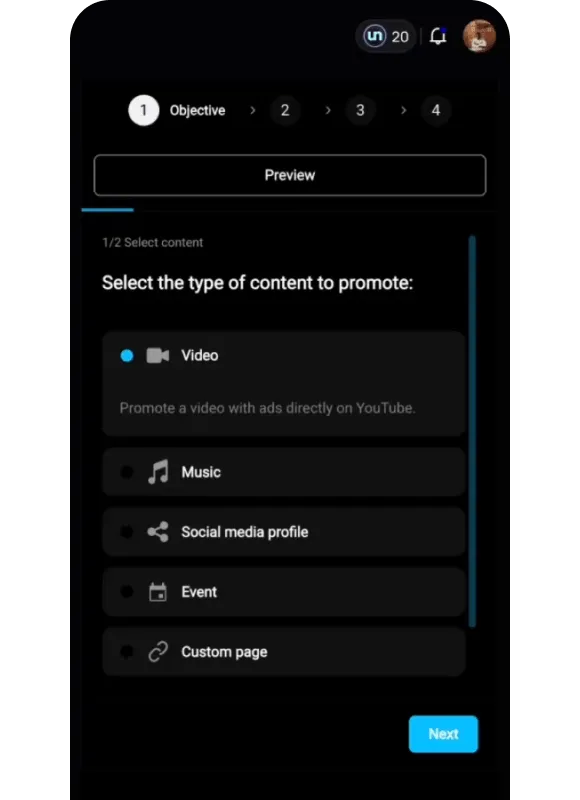
You start by choosing a goal: a video, your music, a social media profile, an event or a custom page. Then you choose an objective, such as streams, Spotify visibility and placements, engagement or followers. For creative, you sync an existing Facebook, Instagram, YouTube or TikTok post or upload your own.
You connect your own social pages to social ads, but you can't connect your own ad account. For Meta, you only need to connect a Facebook Page, and you need administrator access to it to share advertising access with un:hurd.
Targeting
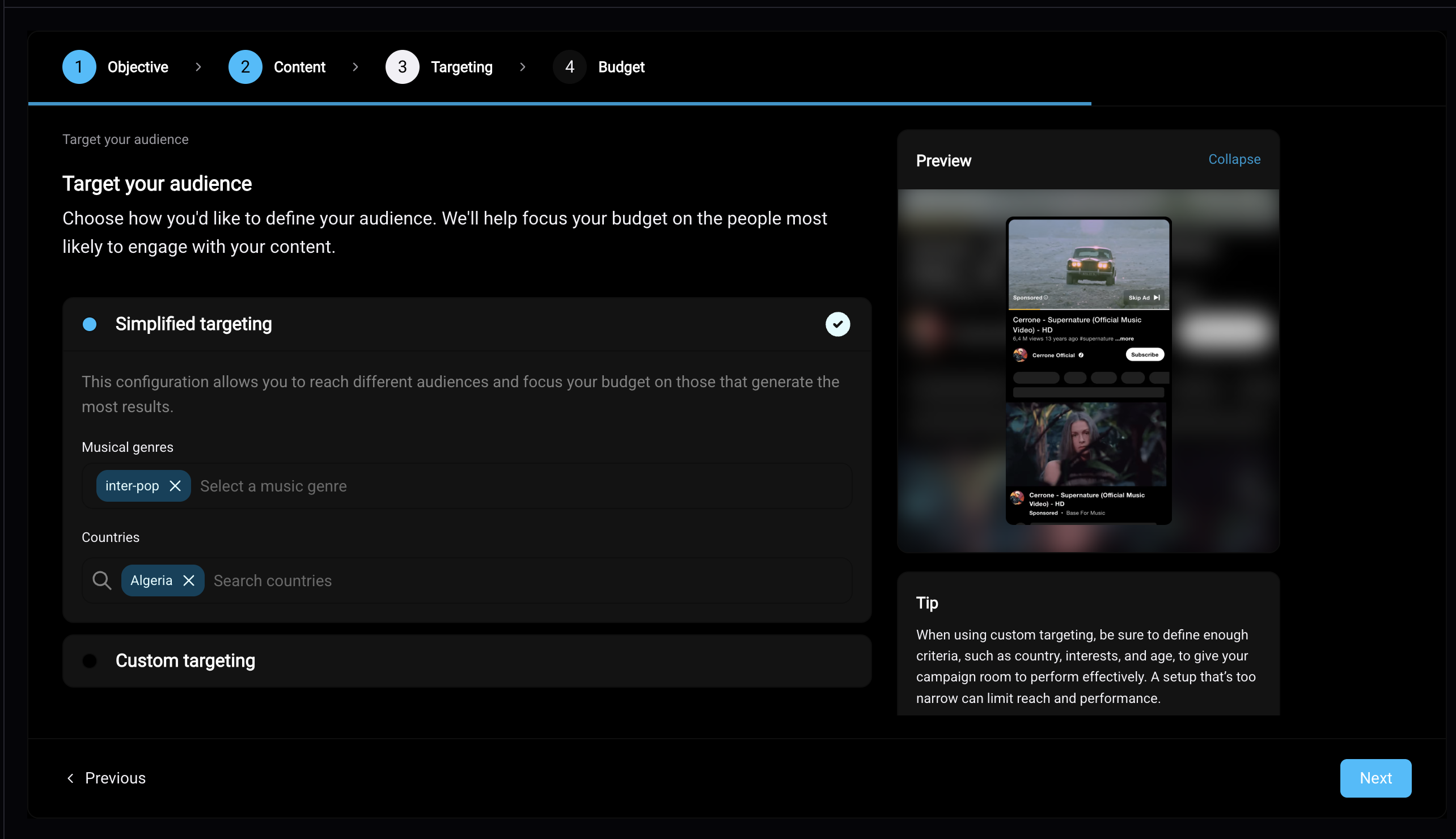
un:hurd sets the targeting for each campaign from your data. If you want to get more specific, open advanced targeting to choose locations, ages and interests based on similar artists. Advanced targeting also lists cities flagged by Insights, so you can put spend where your fans already are.
Budget, fees and timing
Campaigns start from $100. Budgets are priced in US dollars and converted to your local currency at checkout, and you pay at booking by card or PayPal. un:hurd's 20% fee is taken from the budget you set, so the budget is the total you pay. You see estimated results before launch, and campaigns are reviewed and live within 48 hours.
While a campaign runs, it adjusts in the background to optimise its results, and the un:hurd team fixes any issues that come up, such as an audience that's too small. If a campaign doesn't fully run, un:hurd refunds you or offers credit.
Reporting
The Campaigns tab shows each ad with its start and end dates, budget spent, number of results and cost per result. When a campaign is confirmed, you're emailed a link to its full report. The report covers impressions, reach, clicks, streams, streams per listener and new listeners, breaks results down by audience, and shows your Spotify listeners, followers and Popularity at the start of the campaign, at the end and one month after.
What a campaign looks like in practice
Atomic Bruno ran a Spotify audio ad through un:hurd music targeting Brazil from 4 April to 1 July 2026, with $400 of ad spend. The campaign spent $391 and brought 1,067 new listeners, about $0.37 each, along with 1,290 streams at 1.2 streams per listener.
The audience breakdown showed where the money worked. A rock audience on mobile delivered 1,063 of those new listeners at about $0.33 each, while an indie audience cost $1.64 per new listener. Over the same period, Atomic Bruno's Spotify listeners went from about 1,000 at the start to about 12,000 at the end and 14,100 a month later. The report doesn't separate how much of that came from the ad, so read it alongside the new listener figure.
How to run ads around a music release
Run ads in stages around a release, with a different job for each stage. Before release the job is collecting pre-saves. Once the track is out, it's driving streams and saves and bringing back the people who showed interest.
Before release: promote your pre-save
To promote a pre-save with social ads, choose custom page as the goal and send people on Facebook or Instagram to the pre-save link from your smart link provider. You create the pre-save link with a provider such as Feature.fm or Linktree, or through your distributor, and you can add it to your Fan Hub too. Our guide to pre-saves and fan data capture covers how to set one up.
Release week and after: streams and Spotify placements
Once the track is out, switch to a streams objective, or use the Spotify visibility and placements objective. That objective promotes the release with Marquee and Showcase, Spotify-only formats where the release appears prominently on the home screen or through targeted notifications, aiming for plays and saves from highly engaged listeners. Spotify only allows Marquee within 21 days of release, while Showcase can run on new or older releases at any time.
Pair ads with playlist pitching
You can pitch a track to playlists and run social ads on the same track in un:hurd music, using the two tools separately. Nohland pitched a release and ran ads on it with un:hurd. Ads bring listeners in while pitching works on placements, and both feed the same Spotify numbers. For more on when pitching pays off, read is playlist pitching worth it.
Retarget the fans who showed interest
Fan Hub, un:hurd's link-in-bio page, supports ad pixels, so you can later retarget fans who visited it. You can also promote your Fan Hub with social ads by choosing custom page as the goal.
Act on a Shazam spike
When your Shazams in 24 hours jump to more than three times the day before, Insights flags it and suggests a geo-targeted ad in the city where Shazams are highest. A jump like that suggests people are hearing the song somewhere and looking it up.
Which metrics to track on music ads
Track the numbers that show whether people came back to your music after the ad: cost per new listener, streams per listener, saves and follower change.
Cost per new listener
Divide what you spent by the new listeners the campaign brought. It's the simplest way to compare one campaign, audience or network with another.
Streams per listener
Streams per listener tells you whether new listeners played the song once or kept going. A figure close to 1 means most heard it once, so the next step is giving them a reason to return.
Saves
Spotify counts a save each time someone taps the plus button to add your song to their library. Check your saves in Spotify for Artists during and after a campaign. A rise in saves alongside new listeners suggests the ad reached people who want the song again.
Follower change
Followers are the long-term payoff. Spotify says listeners are on average 3 times more likely to stream an artist in the 6 months after following them. Compare your followers at the start of a campaign, at the end and a month later.
Practical tip: test two audiences before you scale
Before you put your full budget behind one campaign, split a small first budget across two audiences, such as two genres or two cities. After a week, compare cost per new listener and move the rest of your spend to the cheaper audience. Atomic Bruno's rock audience cost about a fifth of his indie audience per new listener, a gap you'd miss looking only at total results. This works on any ad platform, including Ads Manager.
The short version
An automated ad platform runs your release ads across networks such as Meta, TikTok, Spotify and YouTube without you working in Ads Manager. Before you choose one, check whose ad account it uses, which networks it covers, how the fee is charged, how much targeting control you keep and what its reports include. Hypeddit, SymphonyOS, SubmitHub, Soundlink, SongFly and un:hurd music's social ads each answer those checks differently, so compare them on the same points before you pay. Run ads in stages around a release, starting with your pre-save and moving to streams and Spotify placements once the track is out. Judge every campaign on cost per new listener, streams per listener, saves and follower change.
For a wider look at automating your release, read our guide to automated music marketing tools, and for other ways to promote your music, see the best music promotion services.
Run your first social ads campaign
If you've got a release coming up, book your first social ads campaign in un:hurd music at app.unhurdmusic.com. Set a budget from $100, let un:hurd set the targeting from your data or open advanced targeting to pick your own cities, and you'll have estimated results before you launch. There's a 7-day free trial.
About the author
Sam Blackie is Head of Growth at un:hurd music, where he works on how independent artists plan releases, pitch to playlists and run ads.