Lyra: The AI Co-Writer for Independent Artists
Create editorial pitches, EPKs, press releases, artist bios, and outreach emails with Lyra, built for independent musicians.
TL;DR
- Lyra is un:hurd’s music-specific AI co-writer for independent artists who need useful campaign copy without starting with a blank page.
- Five live outputs cover Spotify and Apple Music editorial pitches, designed PDF press kits, music press releases, targeted outreach emails, and artist bios.
- You provide release context, confirm profile information, and answer focused questions. Lyra uses those details and relevant connected platform data to create an editable draft.
- You review every claim, statistic, quote, tag, link, and rights detail before taking the suggested next action.
- Lyra cannot guarantee playlist placement, press coverage, representation, sync deals, brand partnerships, or any other campaign result.
What Lyra Is and Who It's For
We built Lyra as a music-specific AI co-writer for independent artists who have limited time to promote a release. Lyra guides you through focused questions about your genre, release story, influences, and goals. Connected platform data can add relevant performance context, so you do not have to rebuild your artist profile inside every prompt.
Lyra works best when you have an active release or announcement to promote. You might need to submit an editorial pitch before a deadline, prepare an electronic press kit for a booking contact, or send a press release to journalists. Lyra also creates artist bios and targeted outreach emails for music industry contacts.
Each flow produces a draft for a specific destination and points you toward the next action. For example, an editorial pitch fits the requirements of its intended platform, while an outreach email changes according to the recipient and purpose.
You remain responsible for the final version. Review every fact, statistic, quote, link, and rights-related claim before sending or publishing the copy. Lyra reduces the work involved in preparing promotional material, but your judgement keeps the result accurate and personal.
How Lyra Turns Release Context Into a Draft
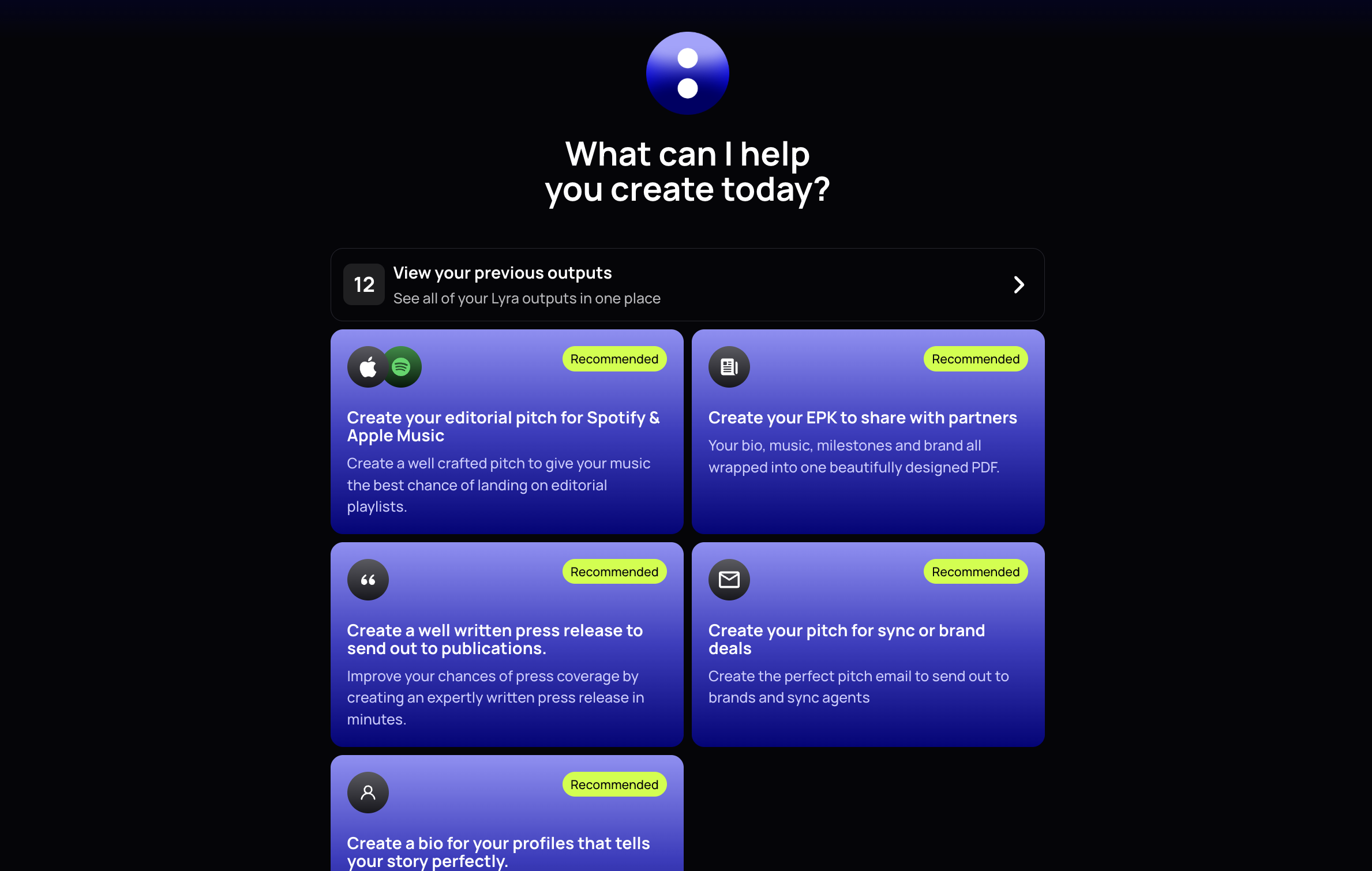
Lyra uses guided creation flows for every output. The home screen offers five creation cards covering editorial pitches, EPKs, press releases, pitch emails, and artist bios. Lyra marks the editorial pitch card as “Recommended” because release pitching often has a fixed submission window.
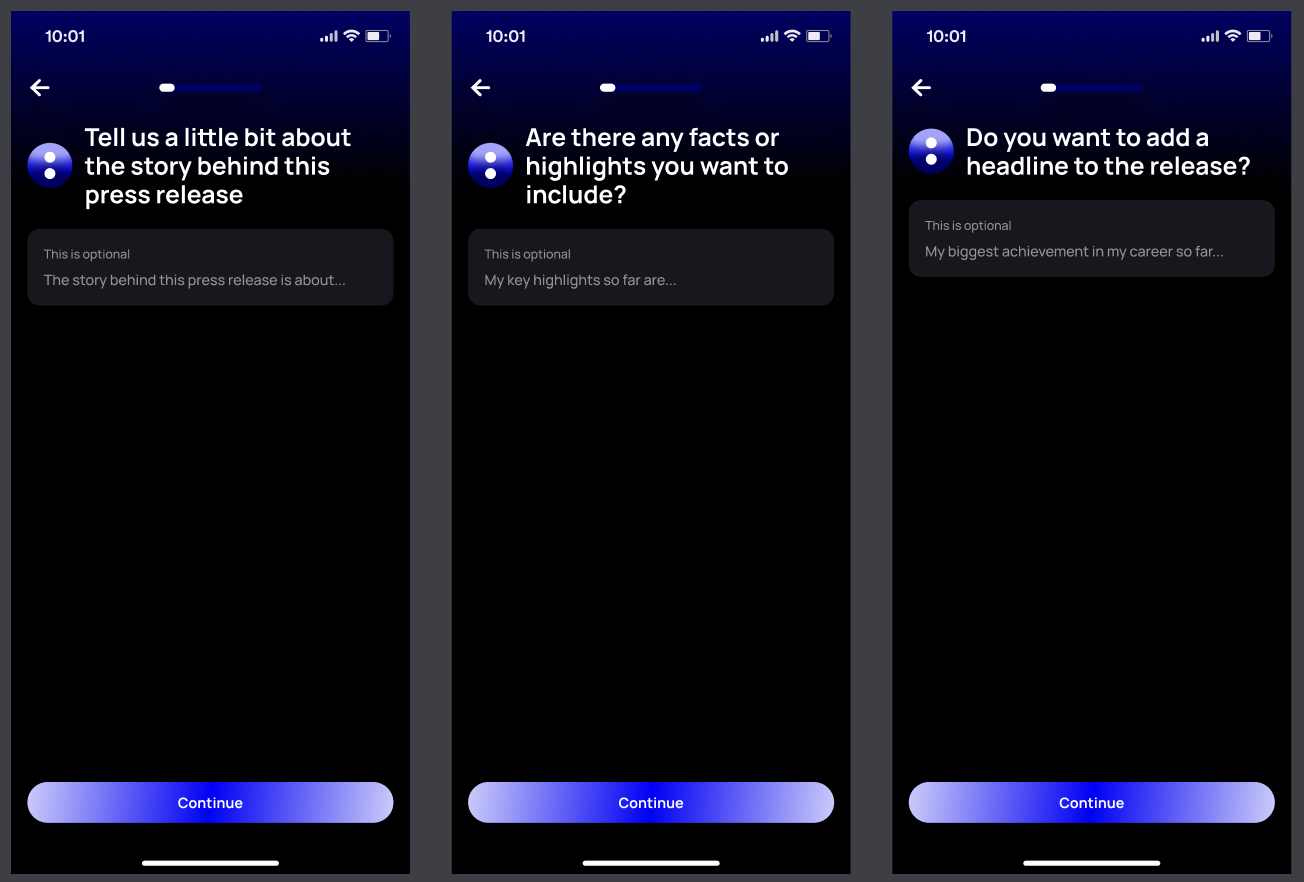
After you choose an output, Lyra presents one question per screen. A progress bar shows how far you have left, while a back arrow lets you revise earlier answers. The final question ends with a “Let’s go 🚀” button instead of the standard Continue button.
Connected accounts reduce how much information you need to enter again. Lyra connects with Spotify and Apple Music, plus Instagram, TikTok, and YouTube. Genre fields arrive pre-filled from your artist profile for confirmation. Lyra can also use relevant profile and performance data, such as monthly listeners or social following, when the chosen format needs supporting evidence. You should still check every figure before using it.
Lyra shows its progress before producing the draft. The first loading screen confirms that you have finished the questions. A checklist then shows Lyra reviewing your answers and details before creating the selected output.
Every finished draft includes Edit and Copy controls. You can revise the wording inside Lyra, copy it to the destination, and provide feedback with thumbs-up or thumbs-down buttons. Lyra stores completed work in a separate history area, which keeps previous outputs outside the creation flow.
Spotify and Apple Music Editorial Pitches
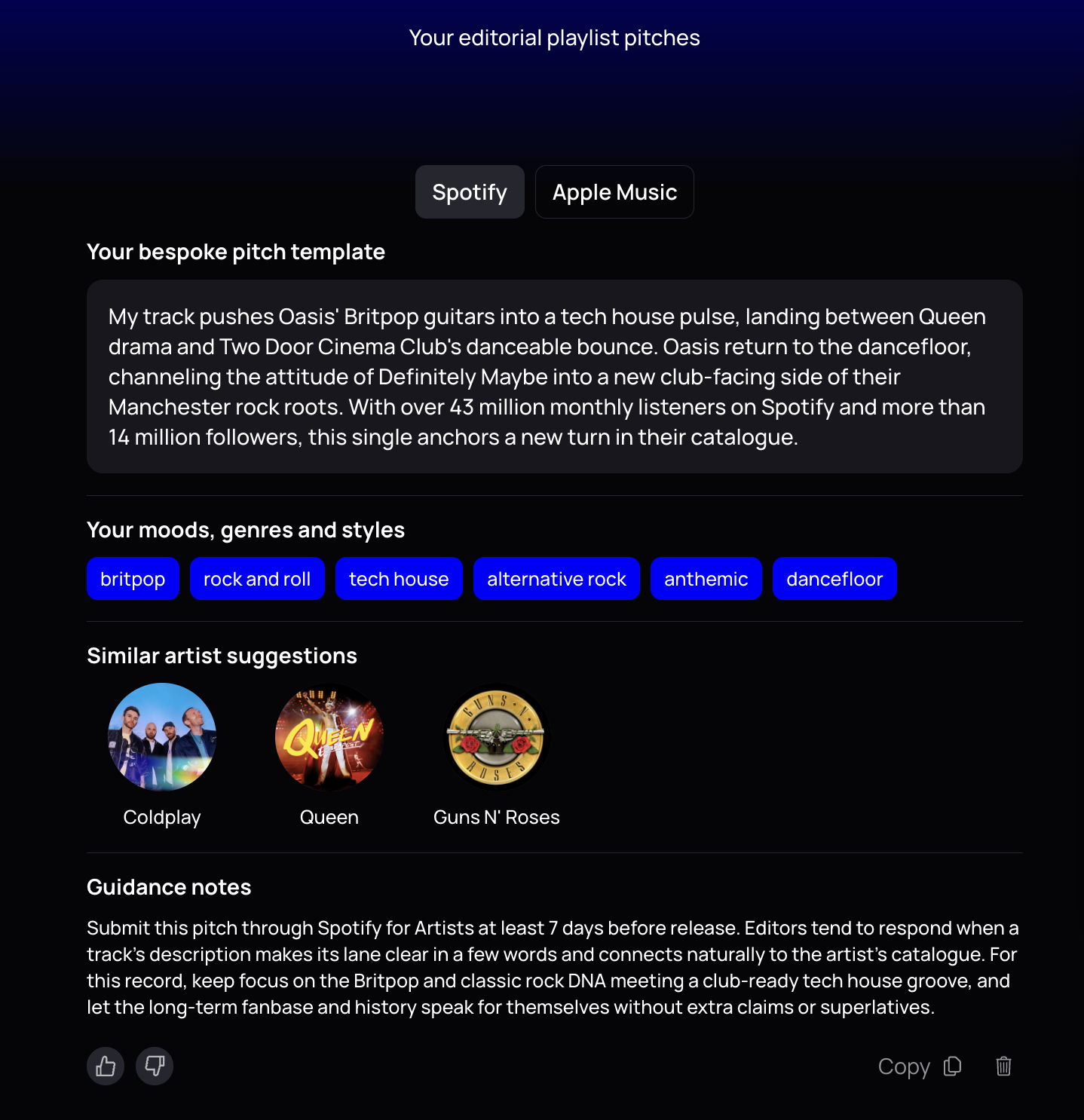
Lyra marks its editorial pitch flow as Recommended because it turns your release details into platform-specific copy. Use it before an unreleased track goes live, while you still have time to submit the pitch and correct any details.
Lyra asks for the track name, release date, genre, and context. Useful context includes the song’s meaning, early traction, promotional plans, and the playlists where you think it fits. Specific details help editors understand the track. For example, “melancholic UK garage written after moving home” gives Lyra more useful material than “emotional electronic song.”
The finished draft opens in separate Spotify and Apple Music tabs. Each version includes a tailored pitch, mood and genre tags, and similar-artist suggestions for the “sounds like” field. Lyra keeps the Spotify copy below the platform’s 500-character limit. You should still check every tag, comparison, and factual claim before submission.
Spotify lets eligible artists pitch an upcoming unreleased song directly through Spotify for Artists. Spotify recommends delivering and pitching your music at least seven days before release, and only one song can remain under consideration at a time. Paste Lyra’s Spotify version into the pitch form, complete the remaining fields accurately, and submit early enough for editors to listen.
Apple Music uses a different route. Artists generally pass editorial pitch copy to a participating label or distributor, which can submit through the Apple Music Connect partner platform. Apple advises artists to work with their distributor when preparing an upcoming release. Ask your distributor whether it offers editorial submissions and what lead time it requires, then send the Apple-specific Lyra copy in its preferred format.
Our editorial playlist pitch guide covers the wider preparation and submission process in more detail. Neither Lyra nor either submission route can guarantee editorial playlist placement.
Designed PDF Electronic Press Kits
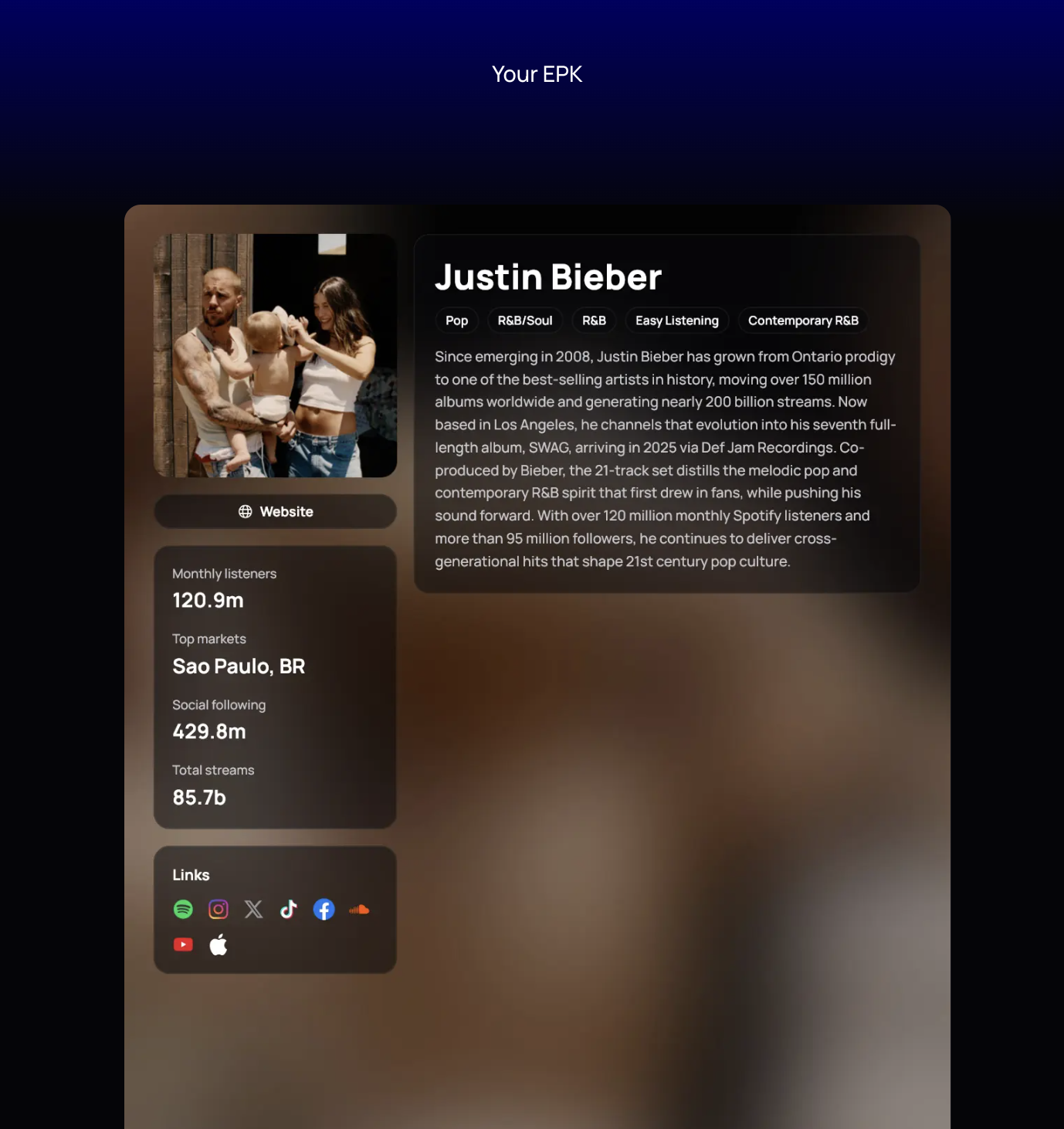
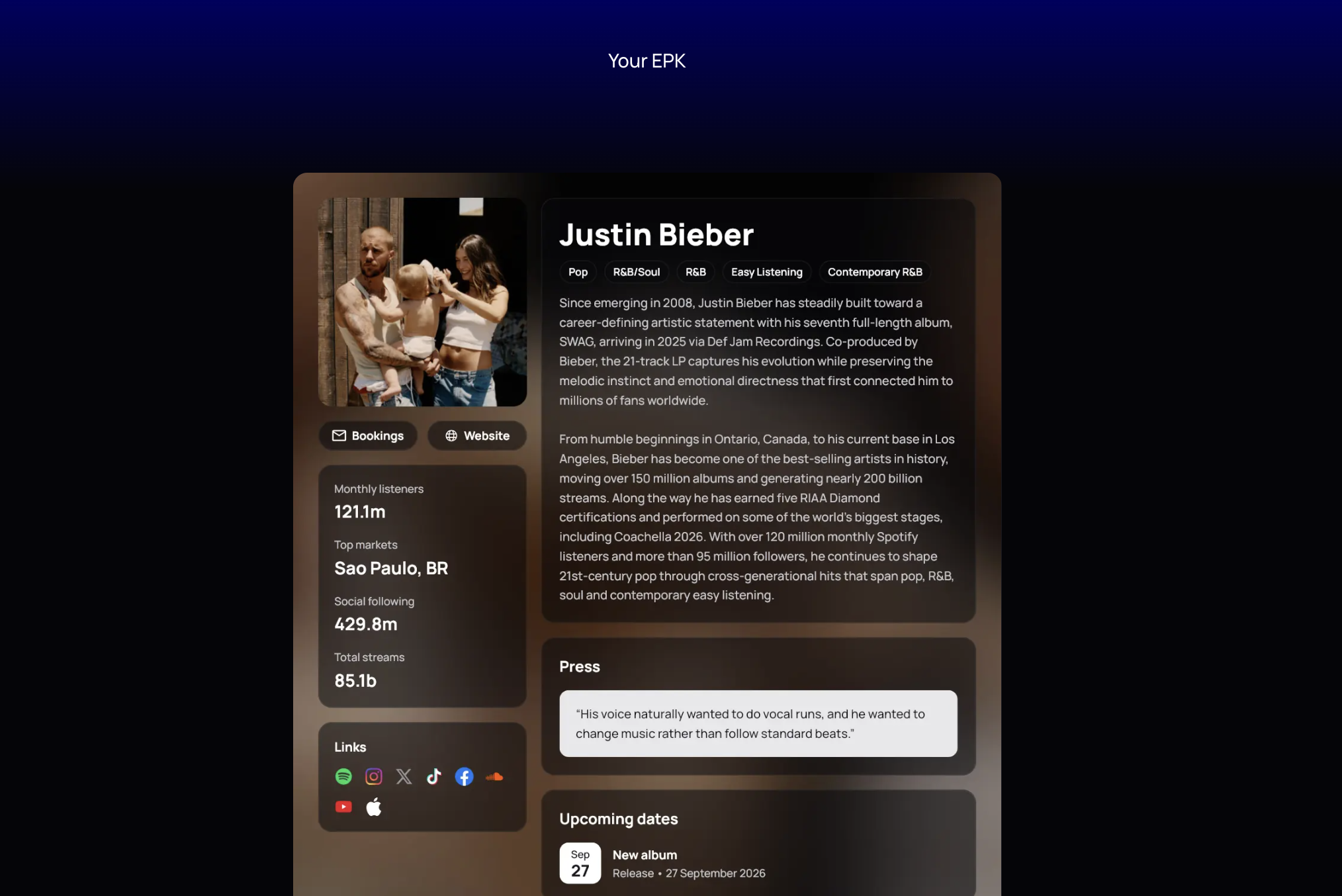
An electronic press kit, or EPK, gives press, booking, sync, brand, and label contacts a quick overview of your work. Lyra turns your artist information into a designed one-page PDF that you can share during an active release campaign.
You provide an artist photo, confirm your genre, and choose a short, medium, or long bio. You can also add testimonials, career highlights, and upcoming shows or releases. Choose details that support the reason for contacting someone. A booking contact may value live dates, while a brand contact may care more about audience fit.
Lyra combines those inputs with connected artist data. The PDF includes your photo and bio, genre tags, discography highlights, press quotes, platform links, and upcoming dates. A statistics block can show monthly listeners, top market, social following, and total streams. Each PDF carries a small “Powered by un:hurd music” footer.
Review every detail before sharing the EPK. Check each statistic against the source account, confirm quote wording and attribution, test every link, and verify names and dates. You should also confirm that you have permission to use the photo and include any required photographer credit. Current, high-resolution images work best when recipients need material for publication.
Send the format your recipient prefers. The Lyra PDF works well as a portable one-sheet or direct attachment when requested. A hosted EPK may suit contacts who need playable music or downloadable media, so you can use the approved PDF content when building that version. Keep the file small enough for email, or share it through a reliable link. Our dedicated EPK guide will cover deeper asset and format standards.
Music Press Releases
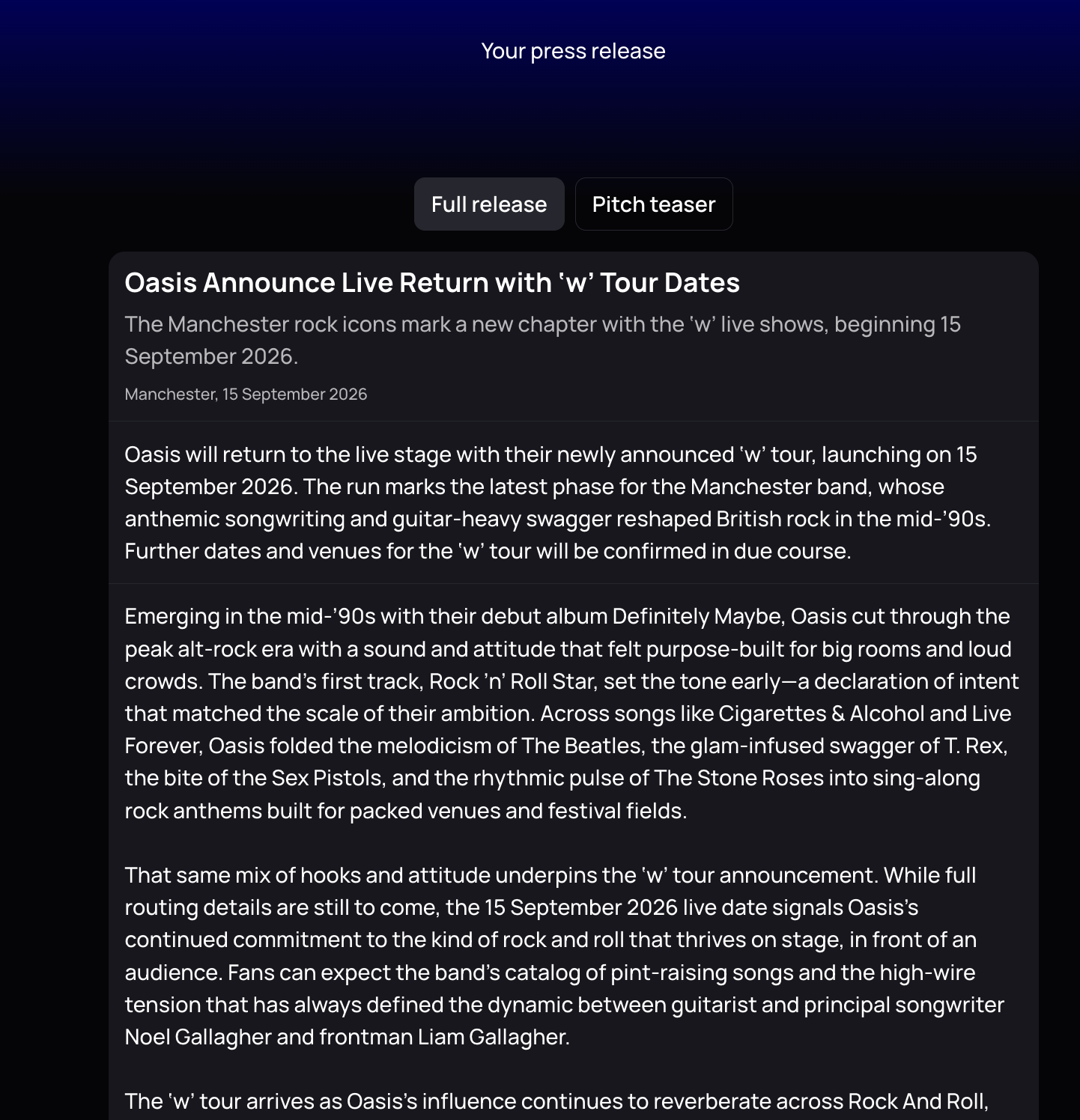
A press release announces a specific piece of news, while your bio describes you and your EPK gives partners a broader snapshot. Lyra starts by asking you to choose New release, Tour, Award, or Other. Your selection changes the questions about the announcement name, date, genre, story, facts, and optional headline.
Lyra produces two versions under separate tabs. The Full release includes a headline, opening, supporting paragraphs, artist quote, short boilerplate, and contact block. You can download the finished draft as a Word document. The Pitch teaser condenses the announcement into three or four sentences for your first message to a journalist.
A credible release needs a clear reason for coverage. A new track alone may not provide enough of an angle, so explain the story behind it, an unusual recording choice, or a relevant collaboration. A music press release guide can help you work through structure and timing in more depth. Lyra can organize the material, but you still need to decide what makes the announcement newsworthy.
Treat any generated quote as illustrative copy. Replace it with something you genuinely said and would approve for publication. Before sending, verify every name, date, link, and contact detail. Check that the opening accurately states the news and remove any claim you cannot support.
Personalize the Pitch teaser for each journalist by referring to their publication, recent coverage, or audience. Send it ahead of the release date so they have time to listen and plan coverage. A clear press release gives journalists useful material, but it cannot guarantee a reply or published coverage.
Artist Bios for Spotify, YouTube, and EPKs
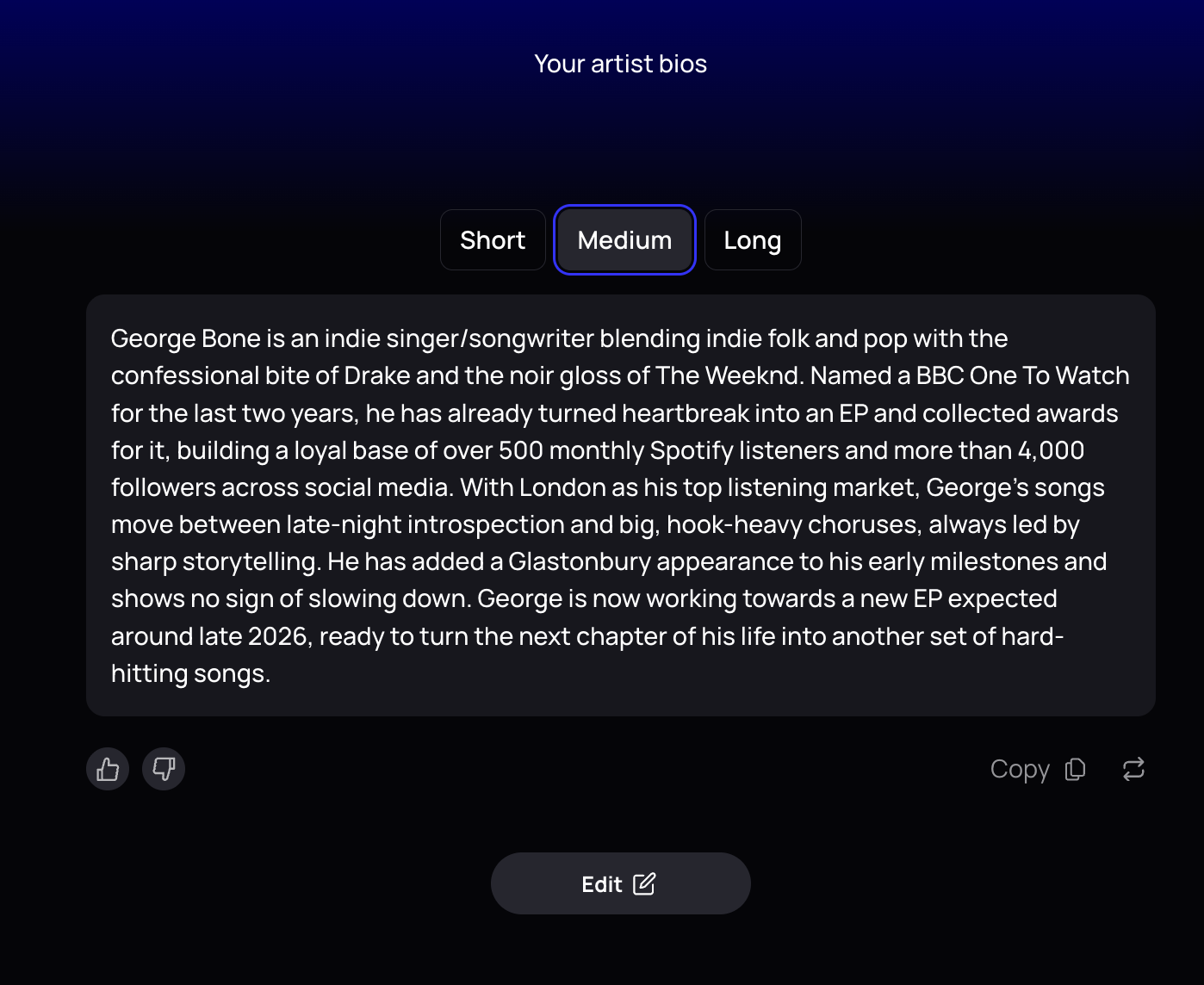
One artist bio rarely works well in every destination because each reader needs a different amount of context. A festival listing may need one sentence, while a journalist reviewing your EPK needs enough detail to understand your career and current release.
Lyra asks you to confirm your genre and select key influences through artist search. You can add career highlights or leave that field blank so Lyra can suggest highlights using connected platform data. You also choose a Professional, Conversational, or Hype/Exciting tone.
Lyra then generates three versions at once.
- Short gives you one sentence for social profiles, festival listings, and press headers.
- Medium gives you 100 to 150 words for Spotify About and YouTube channel profiles. Spotify currently allows bios of up to 1,500 characters and lets you add links or @tags through Spotify for Artists.
- Long gives you 250 to 400 words for an EPK or artist website.
Lyra writes the medium and long versions in third person by default. Third person helps journalists and partners reuse your bio, and EPK guidance from Ari’s Take recommends that convention for a full artist bio. You can still choose a more direct, fan-facing voice for Spotify or YouTube.
Before publishing, check every inferred highlight against your actual history and remove outdated claims. Edit phrases that sound unlike you, and choose the version that suits the platform instead of pasting the same bio everywhere. We plan to publish a dedicated artist bio guide with more detailed examples and update advice.
Outreach Emails for Sync, Brand, Manager, and Label Contacts
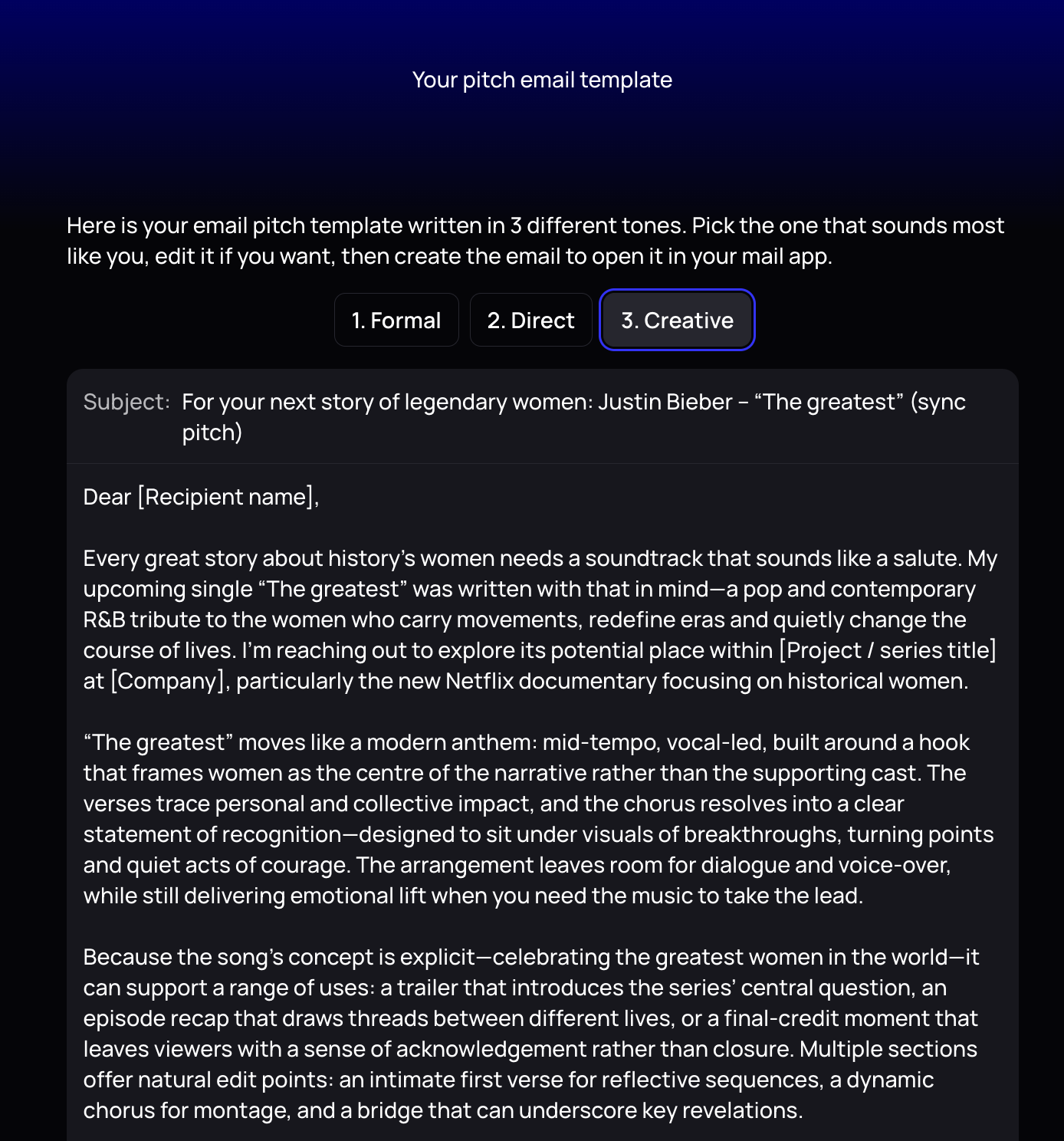
Use Lyra’s pitch-email flow when you have a specific release and industry contact in mind. Lyra asks for the pitch type, recipient type, genre, release name, release date, track link, and any supporting context. Useful context might explain why your listeners suit a brand or why a track fits a particular production.
Lyra generates a subject line and a ready-to-edit email. You can choose a Formal, Direct, or Creative tone, then regenerate the draft if the first version feels wrong. Lyra keeps sync emails concise and track-led, while brand emails foreground relevant audience data. It also flags missing details, such as a streaming link or recipient name.
Each recipient needs a different reason to reply. A sync agent needs a playable link, a clear description of the track’s fit, and accurate ownership and clearance information. A brand contact needs a specific collaboration idea supported by verified audience data. A manager or label contact needs your strongest current music, evidence of momentum, your active release plan, and a precise request for support.
Personalise every draft before sending it. Mention why you chose that recipient, verify rights and clearance claims, and replace every flagged placeholder. Keep links accessible, state the requested next step, and check whether the recipient accepts unsolicited music. un:hurd’s press outreach guidance applies the same practical standard to journalists by recommending relevant personalisation and one-click music access.
Lyra can prepare the structure, but you remain responsible for the relationship and every factual claim. A dedicated outreach-email guide is planned for more detailed examples.
Lyra vs. Generic AI Writing Tools
Lyra reduces the setup required to turn release details into music promotion copy. General-purpose platforms start with broader marketing workflows. Jasper asks you to define context such as brand voice, audience, and company knowledge, while Copy.ai turns a general content brief into a draft.
Lyra starts with music-specific inputs and the artist information connected to your un:hurd profile. You provide details such as the track, release date, genre, and story through a guided flow. Lyra then shapes those details for a specific destination. For example, an editorial pitch leads to copy you can refine and paste into Spotify for Artists, as explained in our playlist submission guide.
A generic AI writing tool can produce similar copy when you provide enough context and a detailed prompt. Lyra saves time by supplying the music-industry framing and connecting each draft to its next use.
Both options require your approval. You should verify every name, date, achievement, quote, and link before publishing or sending the copy. Our press release guide also explains why generated quotes must be replaced with genuine ones.
Which Lyra Output to Use When
Use this table to choose the right Lyra output when you have limited time during an active release campaign.
Reviewing Lyra's Drafts Before You Send Them
Lyra creates a working draft, and you decide what gets sent or published. Use this checklist after completing the next action for each output.
- Verify every artist name, release title, date, collaborator credit, statistic, achievement, and link against a reliable source.
- Replace illustrative quotes with words the named person actually provided. Lyra’s press-release example includes a fictional quote specifically to demonstrate the need for review.
- Remove generic praise, repeated adjectives, and claims that sound bigger than the evidence supports. Rewrite any passage that does not sound like you.
- Check ownership, sample clearance, publishing control, sync availability, endorsements, and partnerships before mentioning them. Add any required photographer or collaborator credits.
- Tailor the draft to its recipient. A journalist needs a clear news angle, while a sync agent needs relevant rights and clearance details.
- Test public and private listening links before sending them. Confirm that private links do not reveal confidential material to unintended recipients.
- Keep sensitive contracts, private contact details, and third-party information out of prompts unless the applicable product policy permits their use.
For Spotify pitches, you remain responsible for the information entered in Spotify for Artists. Final approval always sits with you.
No Lyra draft guarantees editorial playlist placement, press coverage, representation, a sync deal, or a brand partnership. Recipients make those decisions independently.
History, Connected Data, and Getting Started]
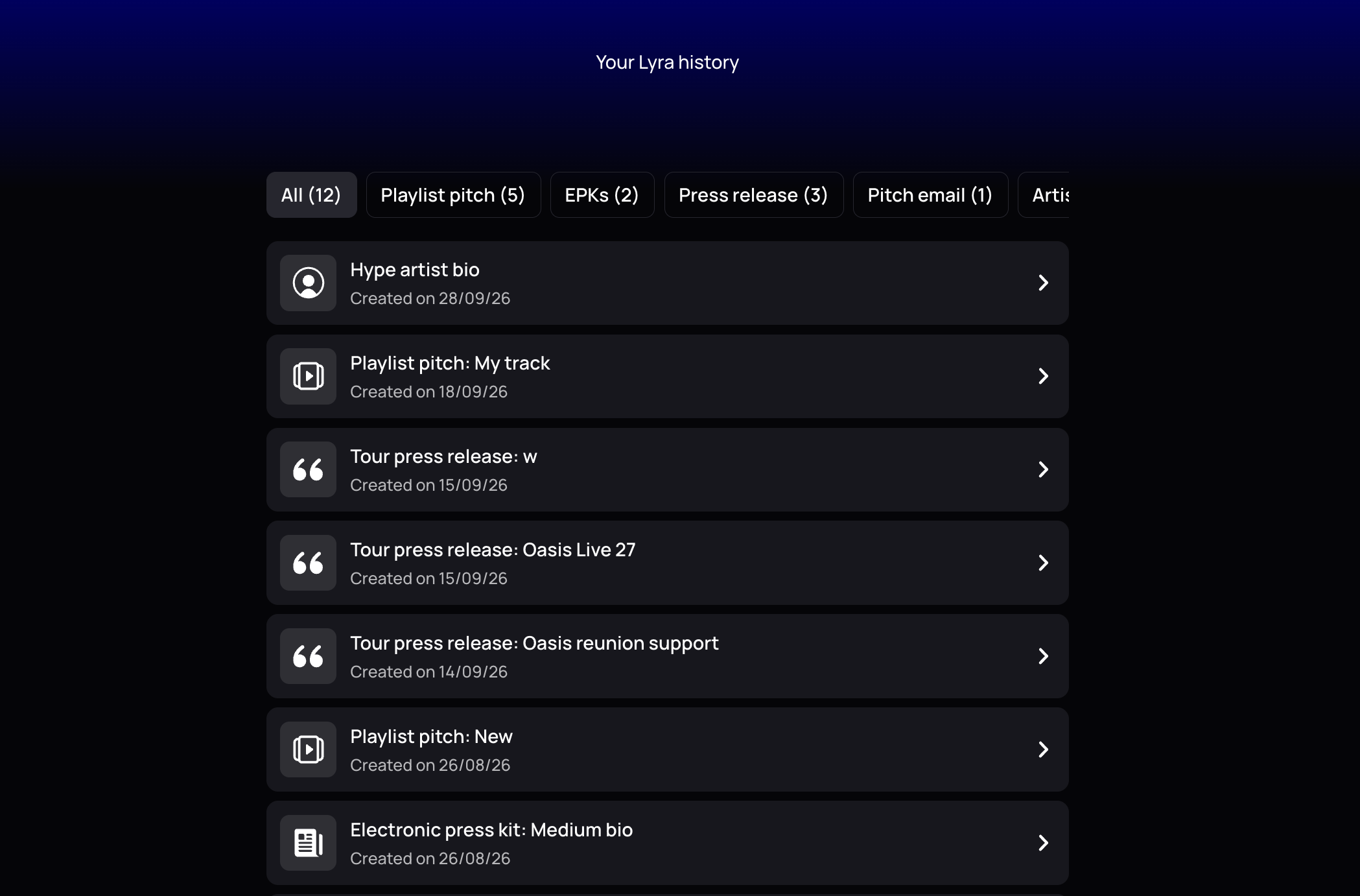
Lyra keeps your previous work together, so you can find an earlier draft without searching through documents. The Your history view shows an output counter, creation dates, and filters for playlist pitches, EPKs, press releases, bios, and pitch emails.
Connected accounts reduce repeated data entry across a release campaign. Lyra can draw relevant profile and performance context from Spotify and Apple Music. Connections to Instagram, TikTok, YouTube, and other platforms can add current social context where useful. You should still check every statistic before publishing or sending a draft, especially when figures may have changed during the campaign.
Add a screenshot of the filtered Your history view here. Show the output counter, filter tabs, and dated drafts.
When you have an active release, connect your accounts and confirm that your artist details are current. Then open Lyra, choose the asset you need next, and review the finished draft before using it.
Start Using Lyra for Your Next Release
When a day job limits the time you can give your next release, Lyra helps you turn your existing release context into a draft you can review and use. Start your free un:hurd trial and put Lyra to work on an active campaign.
After the trial, monthly membership costs £12.99 and includes one playlist pitch worth £6. Annual membership costs £69.99 and includes £72 worth of playlist pitches. Playlist placement and other campaign outcomes remain at the recipient’s discretion.
FAQs
- Does Lyra guarantee playlist placement or press coverage? No. Lyra helps you prepare stronger drafts, but Spotify does not guarantee editorial placement, and journalists decide what they cover.
- Can I submit an Apple Music pitch directly? Apple Music does not provide the same direct artist submission form as Spotify. Send Lyra’s Apple Music pitch copy to a participating label or distributor that uses Apple Music’s partner tools, and confirm its process and lead time first.
- How does Lyra use my connected streaming and social data? Lyra can use profile details and current platform data to prefill context, surface career highlights, and add relevant statistics to outputs such as your EPK. You should verify every figure and inferred claim before publishing or sending the draft.
- Do I need to sign up to see how Lyra works? No. You can review Lyra’s inputs, outputs, and review steps on this page, but you need an un:hurd account to open Lyra and generate a draft.
Keep reading