How to Create an Electronic Press Kit for Musicians
Learn how to create an EPK for musicians, what to include, PDF vs hosted options, and how un:hurd Lyra builds a polished one-page press kit.
TL;DR
- An electronic press kit gives journalists, bookers, labels, sync contacts, and brand partners the information needed to assess your music and contact you.
- You need an EPK for release campaigns, press outreach, booking pitches, sync approaches, and partnership proposals.
- A one-page PDF works well for direct emails and offline access. A hosted page handles richer media and ongoing updates more easily.
- Every EPK should include your bio, release story, music links, images, achievements, quotes, current statistics, upcoming dates, rights information, credits, and contact details.
- un:hurd Lyra suits time-poor independent artists. It uses connected artist data and guided answers to generate a polished, clickable one-page PDF in about a minute once your information is ready when your information is ready.
What an electronic press kit is and when you need one
An electronic press kit is a concise collection of the information and assets that industry contacts need to assess you. Gigwell describes an EPK as a music resume for artists. A recipient should quickly understand who you are, what your music sounds like, why you fit their brief, and how to contact you.
You need an EPK when you prepare a release, run a press campaign, pitch for bookings, approach sync contacts, or contact potential brand partners. Each recipient uses the kit differently. A journalist looks for a clear story and usable images, while a booker checks your live credentials and upcoming availability. A sync contact needs immediate access to suitable music, ownership details, and accurate credits.
Prepare the EPK before outreach begins so you can tailor it to each opportunity without rebuilding the core materials. For example, a single-release pitch should lead with the new track and its story. A festival pitch should give more space to live footage, previous shows, and technical information.
Keep an EPK current even when you have no immediate campaign planned. New music, press coverage, audience statistics, tour dates, and lineup changes can quickly make an older version misleading. A maintained master version gives you a reliable starting point whenever an opportunity appears.
One-page PDF vs. hosted EPK page
Choose the EPK format around how the recipient will open and use it. A one-page PDF suits direct email pitches because the recipient can download, forward, print, or review it offline. A concise one-sheet also lets a journalist or booker scan your story, music, achievements, and contact details without navigating several pages. However, email filters may block large attachments, and downloaded copies can become outdated after you change your dates or statistics.
A hosted EPK keeps one shareable URL and reflects updates as soon as you publish them. Hosted pages can support music players, video, image downloads, contact forms, and deeper information without crowding one document. They require an internet connection, and you must maintain the page and any hosting subscription. A broken domain or incorrect sharing permission can make the kit unavailable.
Bandzoogle provides hosted EPK templates with features such as a music player, tour calendar, and contact form. The service requires a paid subscription and produces a hosted page rather than a standalone document. Sonicbids focuses more directly on booking. Its EPKs can present booking materials such as performance videos, tour history, ticket information, and downloadable stage plots.
Use a PDF when you are sending a targeted email and the recipient needs a fast summary or offline copy. Use a hosted page when you want a central press link that can carry richer media and receive regular updates. For a booking submission, follow the promoter’s requested format or platform. When no preference is stated, include a hosted link in the email and attach a lightweight PDF if the recipient accepts attachments.
Essential sections every EPK needs
Lead with your identity, story, and music. Achievements and statistics should support those essentials rather than dominate the EPK.
- Artist bio. Explain who you are, what you make, and the context behind your work. The un:hurd artist bio guide can help if writing about yourself feels awkward.
- Release story. Explain what inspired the current single, EP, or album and why it matters now. Give journalists a clear, factual angle they can develop. The music press release guide covers this story in more depth.
- Music and video links. Link directly to the strongest relevant tracks, official videos, or live footage.
- Press photos. Provide downloadable, high-resolution images in portrait and landscape formats.
- Artwork. Include the current release cover and a link to a full-resolution file.
- Achievements. Add relevant awards, notable performances, or career milestones that you can verify.
- Quotes. Use short, attributed extracts from credible reviews, interviews, or approved testimonials.
- Statistics. Include current audience or streaming figures only when they help the recipient assess fit.
- Upcoming dates. List confirmed releases, shows, tours, or campaign milestones.
- Rights and credits. Name songwriters, producers, publishers, labels, photographers, and relevant rights holders.
- Contact details. Give recipients one current email address for press, booking, licensing, or management enquiries.
What journalists, bookers, sync contacts, labels, and brand partners each need
Different contacts look for different proof, so move the most relevant information near the top for each pitch. If press outreach is the goal, the un:hurd press-targeting guide explains how to find journalists who already cover similar artists.
- Journalists. Journalists need a timely editorial angle and reliable material they can use. Lead with the release story, then provide a concise bio, working music links, downloadable images, credits, and attributed quotes.
- Bookers. Bookers need evidence that you suit the venue and can deliver a live set. Prioritise a strong live video and relevant performance history. Add upcoming availability and links to your technical requirements when they affect the booking.
- Sync contacts. Music supervisors need to judge whether a track suits a scene and whether the necessary rights can be cleared. Link directly to the track, identify the master and publishing contacts, and disclose any samples or unresolved ownership questions. Include instrumental or clean versions when available.
- Labels and managers. Labels and managers assess your music, career progress, audience, plans, and the proposed relationship. Present dated, sourced statistics alongside recent achievements. Explain your release plan and specify what support you want from the relationship.
- Brand partners. Brand contacts need to understand whether your audience and public identity suit the campaign. Include relevant audience information, previous partnership examples, and a short description of how you could contribute. State any content formats or usage rights you are prepared to discuss.
Image, file, link, mobile, and accessibility standards
Your EPK should open quickly, preserve every link, and remain readable on a phone. Keep the PDF concise, use legible text, and avoid layouts that require zooming or horizontal scrolling. Store full-resolution press photos and artwork in a clearly labelled download folder rather than embedding the largest files. Use common image formats such as JPEG or PNG, and give each file a descriptive name that identifies the artist, image, and photographer where relevant. If compression makes images blurry or text difficult to read, provide a hosted link instead of reducing quality further.
Export settings can break working hyperlinks. Canva preserves links in standard PDF downloads, but flattened PDFs and image exports remove them. Check sharing permissions when your EPK links to another Canva design. Test the downloaded file rather than assuming the editor preview matches the exported version.
PowerPoint users need to choose their export route carefully. Microsoft says PowerPoint for macOS does not preserve hyperlinks during direct PDF export. Microsoft recommends uploading the presentation to OneDrive and downloading it through PowerPoint for the web when you need to preserve links. Compare the resulting file size and quality before sending it. Windows users can choose standard quality or a smaller email version.
Acrobat can add or repair links and reduce file size by compressing images, subsetting fonts, and removing unnecessary data. Adobe notes that PDF optimisation can discard invalid links and other elements. Open the compressed copy on desktop and mobile, then test every music, video, social, download, and contact link.
Accessible EPKs use real selectable text, clear colour contrast, descriptive link wording, and a logical reading order. Add alternate text to meaningful images and mark decorative images appropriately. Tagged PDFs should include a document title, language, active links, and correct tab order. Acrobat Pro can check accessibility for common PDF accessibility problems. Hosted EPK pages need the same basics, including alt text, keyboard access, and responsive mobile layouts.
Rights, credits, and verifying every claim before you send
If UK copyright law applies, confirm who owns or controls every asset in your EPK. The creator is usually the first copyright owner of an original work, while a sound recording's producer is generally its first owner. Employment terms and written agreements can change who owns the work or has permission to use it. Under Intellectual Property Office guidance, paying someone to create commissioned work does not automatically transfer copyright to you.
Keep written licences or assignments for commissioned photography, illustrations, and artwork. Check whether each agreement permits the uses you need, such as EPK distribution, press use, promotion, or partner campaigns. Add the photographer, designer, or illustrator credit required by the agreement. For jointly owned work, confirm that every owner has approved the intended use.
Sync pitches require separate checks for the sound recording and the underlying composition. Identify the owners or authorised controllers of the master, along with every songwriter, composer, and publisher. Include relevant work identifiers and PRS for Music or MCPS details when they help the recipient identify the composition and the parties who control it. PRS for Music guidance distinguishes songwriter, composer, and publisher rights from permissions that other copyright owners may control. Describe a track as fully cleared only after confirming the relevant permissions and splits.
Every factual claim also needs a current source. Date audience, streaming, ticket, and chart statistics. Attribute each quote to its publication and retain a working source link. Check awards, festival appearances, support slots, partnerships, and other achievements against reliable records. Use a professional public email address instead of unnecessary private contact details.
Use these checks as a final accuracy review, not as legal advice. Before sending your EPK, check every statistic, quote, achievement, rights statement, credit, and link against its current source. You remain responsible for the final details whether you build the EPK manually or generate it with a tool.
Common mistakes that undermine an EPK
- Dead links leave recipients unable to hear the music, view press photos, or confirm claims. Test the exported file rather than the editable version.
- Oversized attachments can trigger email limits or discourage downloads. Compress images and confirm that text remains clear.
- Ghost social accounts make an EPK look outdated. Remove abandoned profiles or replace them with channels you actively maintain.
- Exaggerated touring histories and unverifiable achievements weaken credibility. Include only dates, awards, and milestones you can confirm.
- Old statistics misrepresent current performance. Add a date and source to every audience or streaming figure.
- Uncredited quotes prevent recipients from checking who said them. Name the publication, interviewer, or authorised source.
- Missing contact details force recipients to search for a reply route. Include a current email address and the relevant representative.
- Dense layouts can become unreadable on phones. Open the final EPK on a mobile screen before sending it.
- Autoplay audio or video can interrupt recipients and consume data. Let readers choose when to play media.
How un:hurd Lyra creates an EPK for independent artists
Independent artists can use un:hurd Lyra to create a polished EPK without building the layout manually. Its guided workflow turns artist details and connected platform data into a consistent one-page PDF with clickable links.
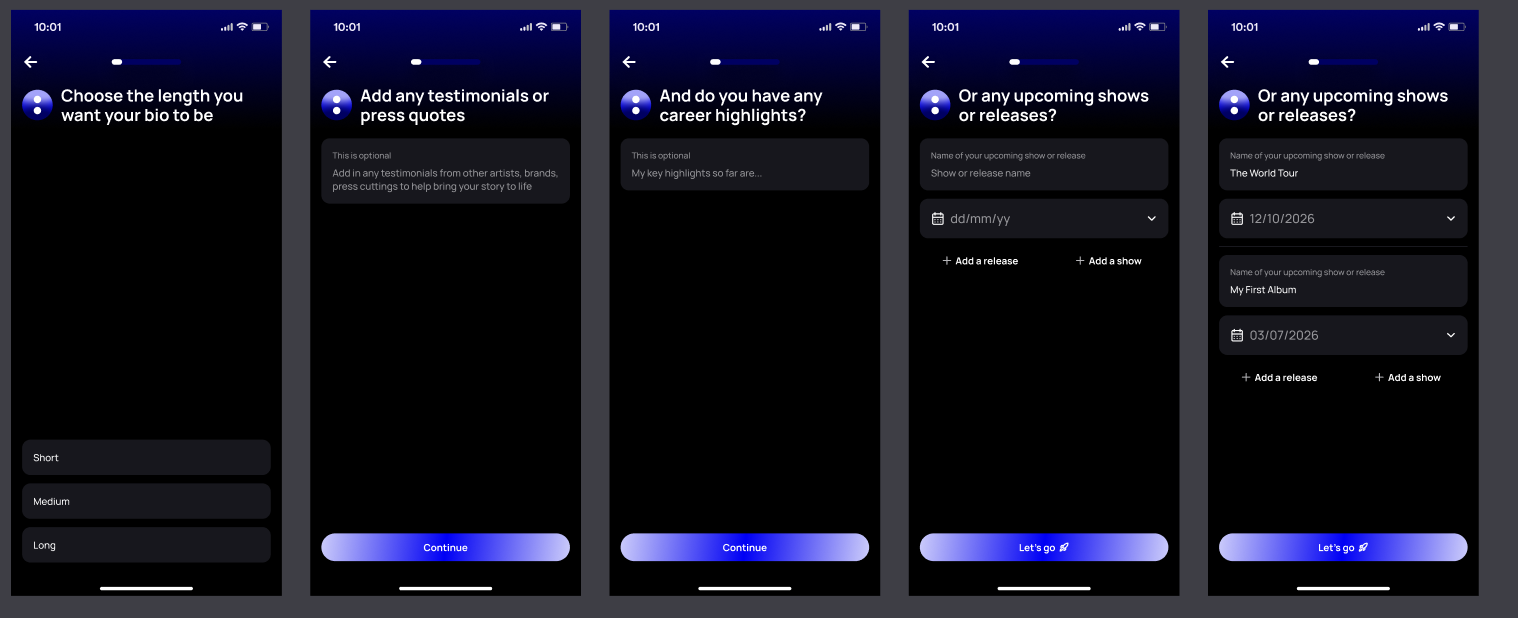
You first name the EPK and confirm your profile image. Lyra then asks you to confirm your genres and choose a short, medium, or long biography. You can add press quotes and career highlights before entering upcoming shows or releases. Once you confirm those details, Lyra generates the document. The Lyra EPK workflow can take about 60 seconds when your information is ready, although preparation and review may take longer.
Lyra can use available data from connected Spotify, Apple Music, Instagram, TikTok, and YouTube accounts. The information Lyra can add depends on the connected accounts and available fields. It may include streaming destinations, social links, audience figures, or market information. Connected data reduces repeated entry, but platform figures can change between collection and sending.
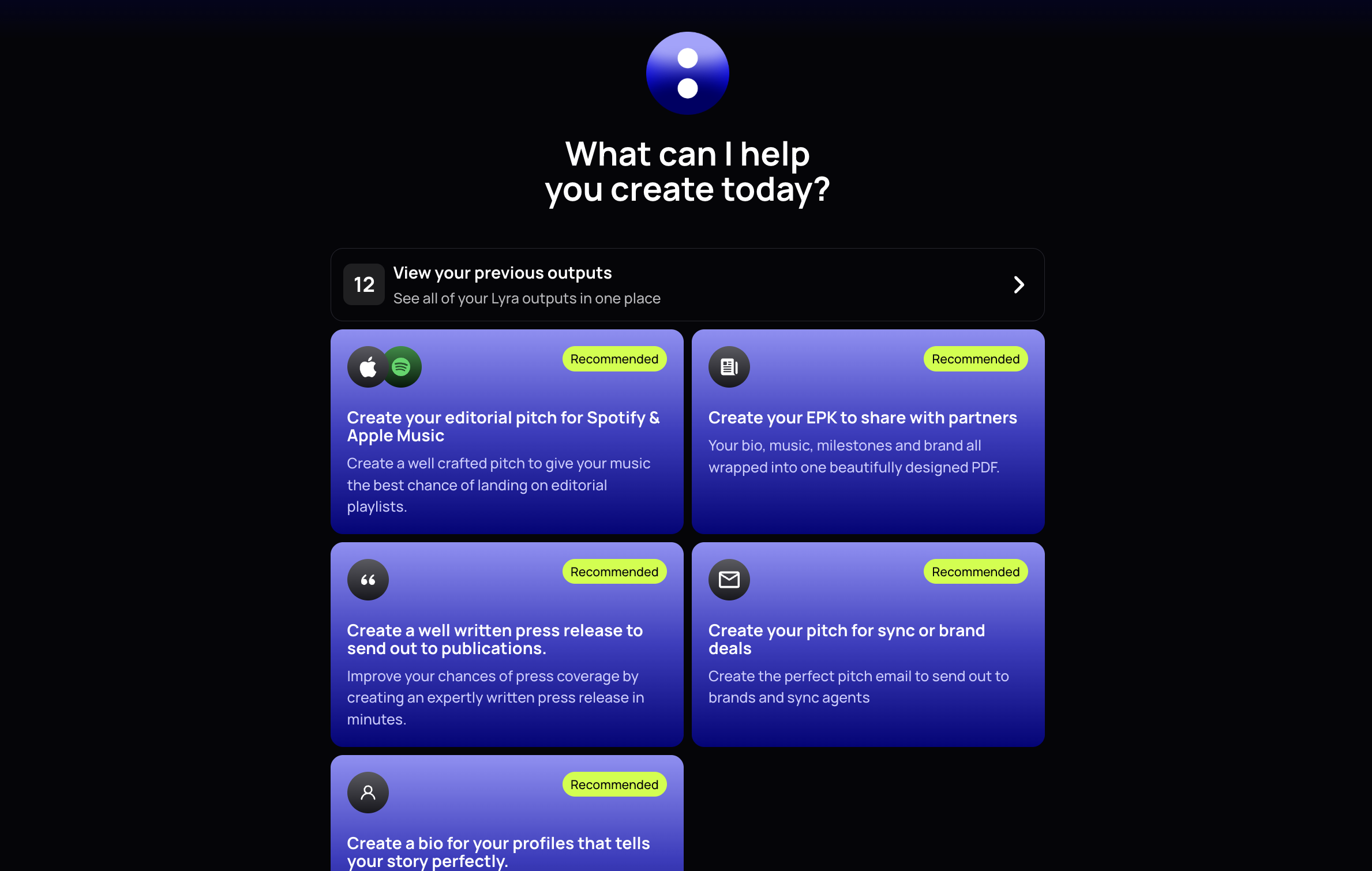
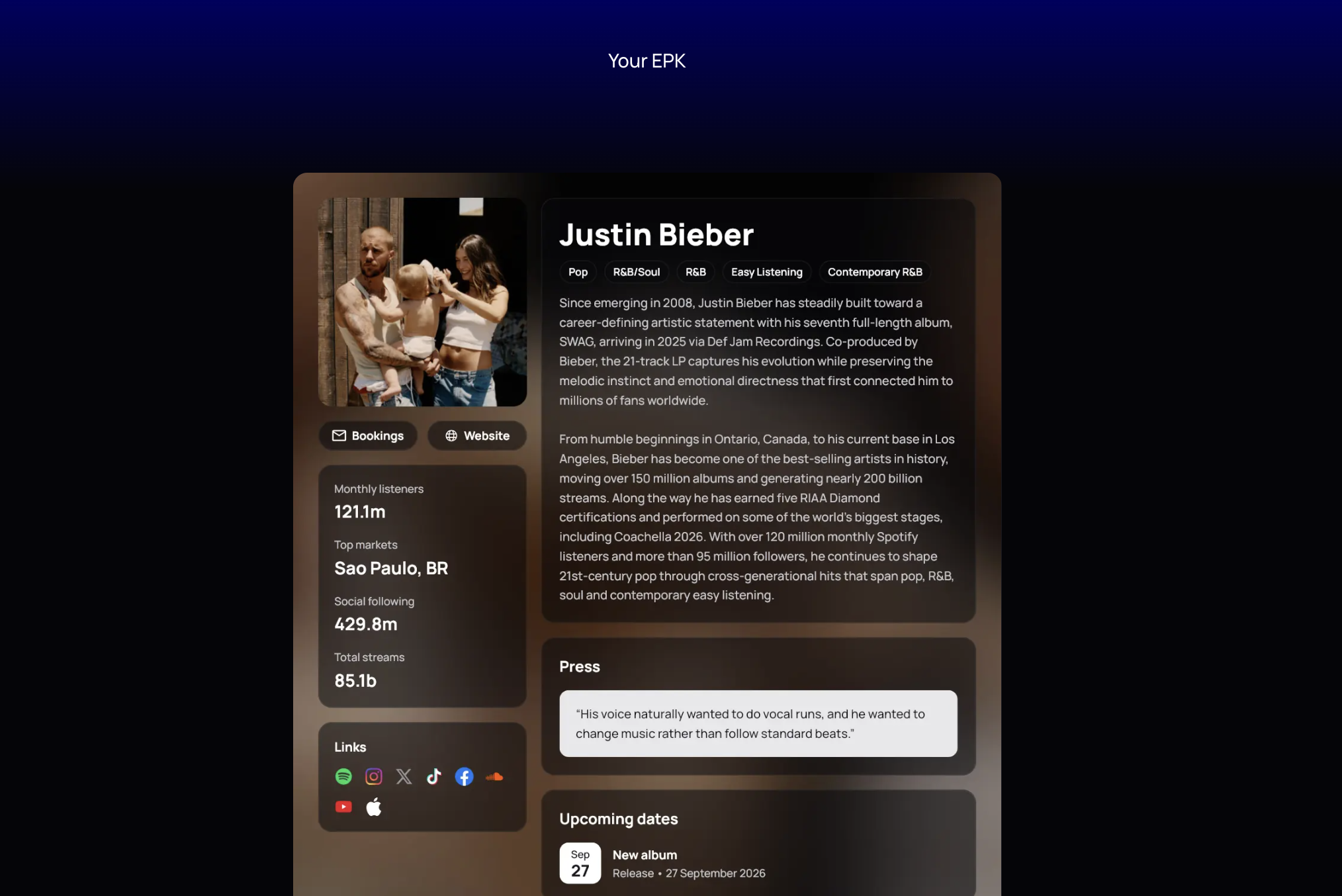
The finished PDF can present your core profile information and contact routes. Depending on the data you provide, it can include your image, genre tags, biography, statistics, website, booking email, and platform links. You can edit the generated EPK, copy its content, download the PDF, or share it. Lyra also stores previous work in a history area so you can find earlier versions.
Lyra requires a paid un:hurd membership. It provides a consistent one-page design but offers less layout control than manual tools. Artists who want complete control over every design choice may prefer PowerPoint, Canva, or Acrobat. Regardless of the tool, you must verify every statistic, quote, attribution, date, career claim, rights statement, and destination link before sending. Lyra cannot guarantee press coverage, bookings, representation, sync deals, brand partnerships, playlist placements, or other campaign results.
Generated PDF vs. manual PowerPoint, Canva, or Acrobat workflows
Manual tools offer greater control over layout, branding, and content placement, but you must build, export, and test the document yourself. You also need to repeat those steps after each update. Export behaviour varies by tool, so follow the link, mobile, and accessibility checks above before sending the PDF.
un:hurd Lyra is intended for artists who want to reduce manual setup and use a consistent one-page design. Lyra uses guided answers and connected artist data to reduce repeated data entry, then generates a professionally designed one-page PDF with clickable links. Manual tools remain a better fit when you want detailed control over every layout decision. Whichever route you choose, verify every statistic, quote, date, credit, claim, and link before sending the EPK.
Keeping your EPK current across a release cycle
Treat your EPK as a working release asset and review it whenever the campaign changes. Before announcing a single or album, update the release story, artwork, music links, credits, and key dates. Once the release goes live, replace private listening links with public destinations and confirm every link works.
New evidence should trigger another update. Add useful press quotes, confirmed achievements, upcoming shows, and current audience statistics at meaningful campaign checkpoints. Date statistics so recipients know when you recorded them, and verify each figure against its source. Update the bio and images when your lineup, sound, or visual identity changes.
Save each approved EPK with a clear version date, archive superseded copies, and identify one file or URL as the current version. Whether you update the kit manually or with Lyra, retest its links and verify changed facts before sending it.
Pre-send checklist
- [ ] Open the final file and confirm every page displays correctly.
- [ ] Test every music, video, social, download, and website link after export.
- [ ] View the EPK on a phone and check text size, images, buttons, and spacing.
- [ ] Confirm the artist name, release title, dates, biography, and upcoming shows.
- [ ] Add a date and credible source for every audience, streaming, sales, and ticket statistic.
- [ ] Attribute each quote to its publication or speaker, retain a working source link, and confirm permission where required.
- [ ] Verify every award, support slot, festival appearance, chart position, and partnership claim.
- [ ] Confirm photo and artwork permissions, creator credits, songwriter details, publisher information, and recording ownership.
- [ ] Check that any sync clearance claim matches the agreements held by all relevant rights owners.
- [ ] Confirm the public contact name and email address, and remove unnecessary private information.
- [ ] Check the filename, file size, and sharing permissions before attaching or publishing the EPK.
- [ ] Send the finished version to yourself and test it through the same email or sharing route the recipient will use.
Related guides for your press campaign
Use the relevant un:hurd guide when you need more help with a specific part of your press campaign. Use the artist bio guide to sharpen how you describe your music, follow the music press release guide when announcing a release, and use the press-targeting guide to find journalists who cover artists like you.
Get your EPK built
un:hurd Lyra uses guided answers and connected artist data to create a polished one-page EPK PDF with clickable links. You can use the finished document for press, booking, sync, label, or brand outreach after checking that its content suits the recipient.
Before sharing the PDF, verify every statistic, quote, date, rights statement, credit, claim, and destination link. Lyra reduces manual design and data entry, but you remain responsible for the final content.
Create your EPK with un:hurd to create a consistent kit without assembling slides or formatting a PDF by hand.
FAQs
- Should my first EPK be a PDF or a hosted page? Choose a one-page PDF for direct email pitches and easy offline viewing. Choose a hosted page when you need to update content frequently or provide more music, video, and downloadable assets.
- How often should I update my EPK? Review it before every campaign or important pitch. Update it whenever you release music, receive useful press, announce dates, change your lineup, or publish newer statistics.
- Can I make an EPK manually? Yes. PowerPoint, Canva, and Acrobat can produce a professional music press kit, but you must check the exported layout, links, file size, and mobile display.
- What contact information should an EPK include? Include a direct contact for the artist or the representative handling the enquiry. Use a monitored professional email address and identify what the contact handles.
- Do EPK statistics need sources? Yes. Add a date and source for streaming figures, audience numbers, ticket sales, chart positions, and similar claims so recipients can judge how current they are.
- What file format and size should I use for email? Use a PDF unless the recipient requests another format. Keep the attachment as small as practical without making text or images difficult to view. If the recipient specifies a size limit or blocks attachments, send a hosted download link instead.
Keep reading