Spotify Playlist Safety Guide: Avoid Bots, Fake Streams, and Risky Promotion
Learn how to spot risky Spotify playlists, avoid artificial streaming, vet promotion providers, and respond fast to suspicious streams.
TL;DR
- Spotify defines artificial streaming as plays that do not reflect genuine listening intent, including streams generated or manipulated by bots and scripts.
- Reject services that promise streams or guaranteed playlist placement. Paying for honest consideration can be legitimate, but you should still check the provider and playlists carefully.
- No single spike, unusual country, low save rate, or Spotify bot checker result proves botting. Look for several warning signs together and ask the provider to explain them.
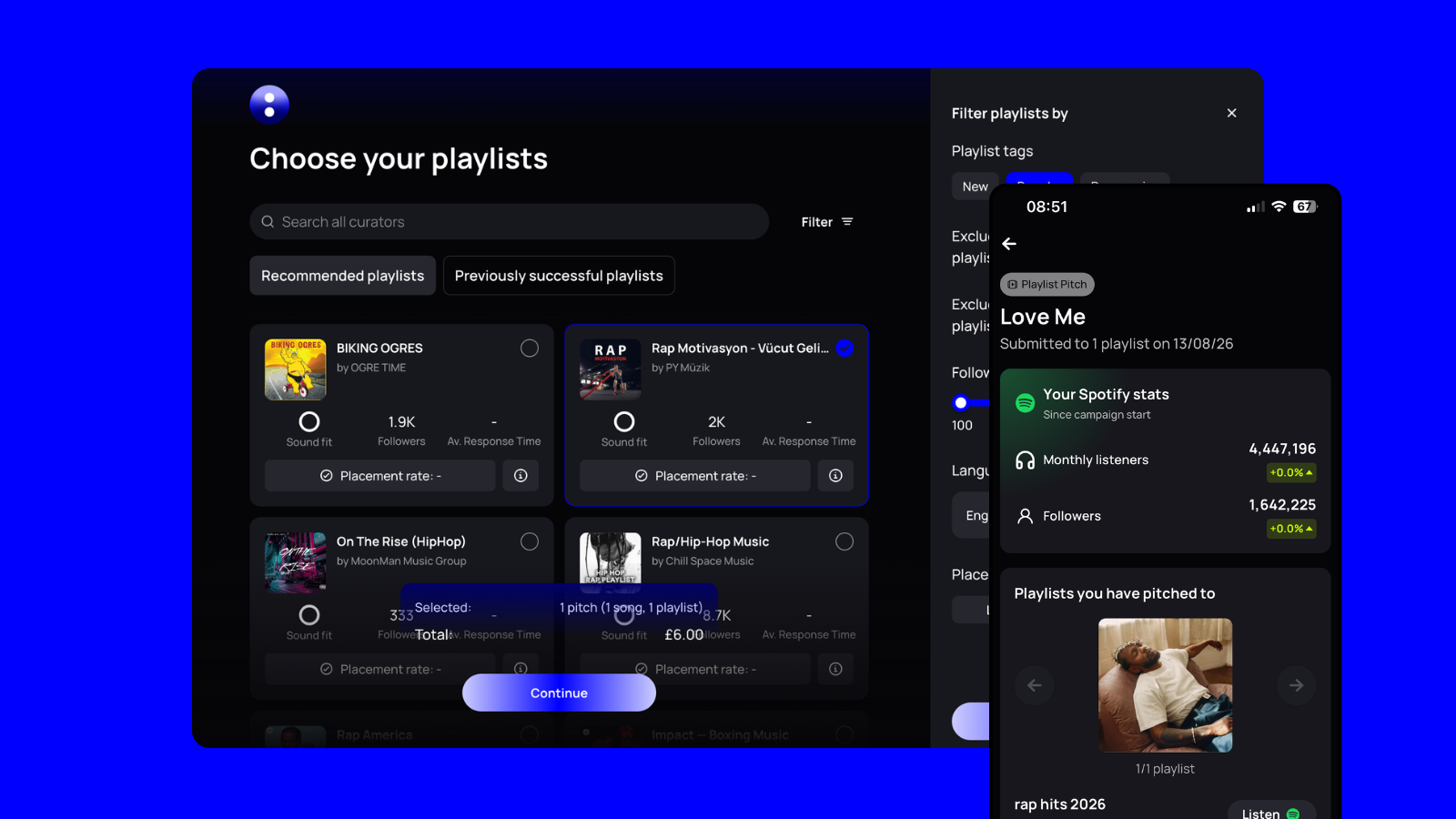
- un:hurd offers a safer starting point for time-poor independent artists through listener-overlap matching and manual curator vetting. Placement, streams, and campaign results are never guaranteed.
- If you are panicking right now Take screenshots of Spotify for Artists, save the playlist and campaign details, and stop the promotion. Avoid deleting messages or changing anything else until you have a clear record of what happened.
What counts as artificial streaming (and what's just paid promotion)
Spotify defines artificial streaming as plays that do not reflect genuine listening intent. Bots and scripts qualify, but automation is not required. Fans can also trigger Spotify’s detection systems by repeatedly looping one track, coordinating streams through specific playlists, or using extra accounts solely to play your music.
A legitimate submission fee pays for honest consideration. The curator can listen, decide your track does not fit, and reject it. Spotify prohibits third-party services that promise streams or guaranteed playlist placement for money. No provider can guarantee algorithmic support either. Spotify also tells artists to be highly sceptical of services that charge for consideration without promising placement. The word “consideration” does not make an offer safe by itself. You still need to understand how the provider finds curators, screens playlists, and handles suspicious activity.
Run your first checks before paying. Read the offer closely, research the playlist, and ask the provider direct questions about its methods. While the campaign runs, watch Spotify for Artists for changes that do not match the promotion you approved. If something looks wrong, take screenshots, stop the campaign where possible, and contact the provider and your distributor. Following those steps helps you respond quickly without treating one unusual number as proof of botting.
Before you pay: a playlist and provider safety check
Give the playlist and provider five focused minutes before you spend anything. Open both side by side, then work through these checks.
- Check the musical fit. Scan recent additions and ask whether your track genuinely belongs beside them. A broad playlist that accepts unrelated genres may care more about submission volume than listener fit.
- Check who runs it. Look for a named curator, working contact details, and a consistent online presence. Search the curator and playlist names alongside terms such as “bot” or “fake streams.” Anonymous ownership does not prove wrongdoing, but it gives you fewer ways to resolve a problem.
- Check its history. Look at how often the curator updates the playlist, how long tracks usually stay, and whether its theme remains consistent. Treat sudden follower growth or an old playlist with little visible activity as prompts for more questions, not proof of artificial streaming.
- Read the provider’s promise carefully. Payment should cover consideration or campaign work, never guaranteed placement or a fixed number of streams. Spotify prohibits paid services that promise streams or playlist placement. Walk away when a provider hides its methods, avoids direct answers, or claims it can influence Spotify’s algorithm.
- Check what happens when numbers look wrong. Ask what reporting you will receive, how the provider rechecks playlists, and whether it can request a fast removal. Save the provider’s answers and campaign terms before paying. Spotify also recommends checking reviews and speaking with artists who have used the service.
For time-poor independent artists, un:hurd offers a more guided starting point. Its listener-overlap matching narrows your search to relevant opportunities, while manual curator vetting reduces the research you need to do alone. You should still run your own checks, and no matching method can guarantee placement, streams, or results.
Judging a playlist's real audience without obsessing over follower count
Follower count shows a playlist’s potential reach, but it cannot tell you whether people still listen or care about the tracks. A playlist may have built its following years ago, changed genre, or lost active listeners. Spotify also treats unique listeners and artist followers as separate measures, so a larger number does not automatically signal stronger engagement. You cannot see the identities of individual artist followers either, according to Spotify for Artists.
Look for several signals that support each other. Listener locations should make sense for the playlist’s genre and audience, although an unexpected country can reflect genuine discovery. Check whether saves and artist follows rise alongside streams. Then watch whether some of those listeners return after the placement ends. Real audience growth usually leaves some activity behind.
Your source-of-stream data adds context. Compare any source change with the date your placement started. An unexplained jump deserves a closer look when it appears alongside mismatched geography, few saves, and no repeat listening. None of those clues proves artificial streaming by itself.
Use How to Evaluate Spotify Playlist Quality Before Pitching for the full weighted checklist. For a quick decision, focus on whether the playlist sends relevant listeners who take meaningful actions rather than treating its follower total as proof of quality.
Bot-checker tools: what they can flag and what they can't prove
A Spotify bot checker can flag known risks, but it cannot confirm that individual streams came from bots. Use one as an early warning rather than a final verdict.
The free checker powered by artist.tools accepts an artist name or Spotify profile URL. It compares playlists linked to that artist against artist.tools data on known high-risk playlists. If you want to inspect one playlist before pitching, artist.tools offers a separate Spotify playlist bot checker.
The checker does not access your private Spotify for Artists data or verify individual listening sessions. Its coverage depends on playlists already recorded in its database. A clean result only shows that the tool found no known high-risk playlists in the available data. A flagged result also does not prove that you requested, paid for, or knew about suspicious activity.
Combine checker results with the playlist and provider checks you have already made. Review the playlist’s genre fit, curator identity, update history, and audience geography. Ask the provider how it vets curators and whether payment covers honest consideration rather than guaranteed placement. During the campaign, compare any warning with changes in stream sources, saves, follows, and repeat listening.
Several consistent warning signs give you a stronger reason to pause than any single tool result. If a checker flags a playlist, take screenshots, save the playlist link, and check when the unusual activity began. A clear tool result should never replace ongoing monitoring.
What to watch in Spotify for Artists while a campaign is live
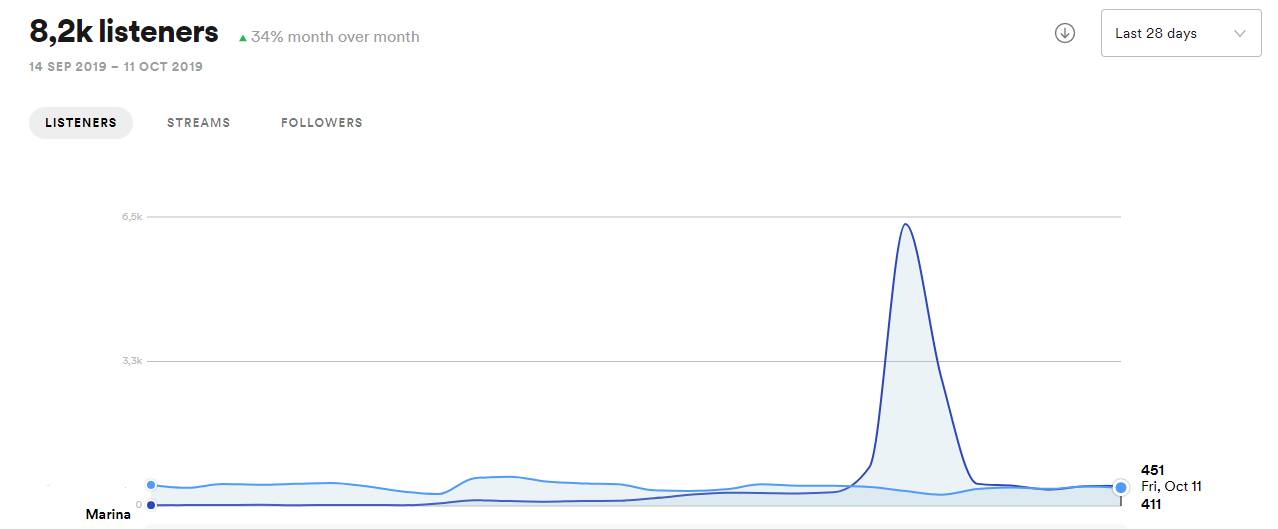
Check Spotify for Artists at the same time each day while your campaign runs. A quick daily review makes sudden changes easier to spot without turning analytics into another full-time job.
- Streams. Open the Music tab and review daily numbers for the promoted song or release. Spotify lists an unexplained spike followed by a sharp drop as a possible sign of artificial streaming.
- Listener locations. Check the geographic data in the Audience tab. New listeners from an unexpected country may reflect genuine discovery, but a large overnight jump deserves attention when the playlist or campaign did not target that location.
- Stream sources. Review the Source of streams view and compare active listening with programmed sources. Spotify groups some activity under “Other,” so a surprising increase there needs context rather than an immediate verdict. Its source categories help you work out whether the listening pattern matches the campaign.
- Followers. Use the Audience tab to compare follower growth with listener activity. A sudden jump that disappears quickly can be suspicious, especially when streams, saves, and repeat listening show no similar movement. Spotify records dashboard dates in UTC, so use that timezone when taking screenshots or noting when a change began. You can review daily listener and follower numbers by hovering over the timeline in Spotify for Artists.
Spotify for Artists can show what changed, but it cannot prove who caused the change or whether bots were involved. Compare several signals, save screenshots, and ask the provider for an explanation before drawing a conclusion.
Red flags: reading the signals together
One unusual number rarely proves artificial streaming. Look for several signals that appear together, especially when the activity does not match the playlist, your audience, or the provider’s explanation. Spotify lists sudden stream spikes, unexpected locations, surprising sources such as “Other,” and short-lived follower growth among its warning signs.
When signals conflict, choose the safer call until you can explain what changed. A clear provider should help you trace the playlist, timing, and promotion method without dodging your questions.
Spotify's policy and what actually happens if you get flagged
Spotify removes confirmed artificial streams from royalty calculations, public stream counts, charts, and recommendation signals. Its artificial streaming policy also prohibits paid services that promise streams or guaranteed playlist placement. Paying for genuine consideration does not guarantee safety, so check how any provider finds and vets playlists before you pay.
Spotify may remove your track from playlists when it confirms artificial activity. In more serious cases, Spotify may remove the track completely, particularly when the track appears mainly intended to generate artificial streams. Your distributor may also issue a warning, charge a fee, suspend your account, or remove your music.
Your private Spotify for Artists dashboard may still show a suspicious spike after Spotify adjusts the public numbers. Spotify cleans confirmed artificial activity from public monthly listener and all-time stream counts each day. When the difference becomes significant, Spotify may add a message to the release or audience page in Spotify for Artists.
You can report a suspicious playlist directly to Spotify for investigation. Contact your distributor or label immediately if Spotify flags your release, especially when the activity happened without your knowledge. Share the playlist link, campaign details, provider name, screenshots, and any messages about promised results. Spotify sends confirmed artificial streaming reports to distributors and labels, so they usually handle warnings, fees, account action, and any challenge based on legitimate promotion.
If you spot something suspicious: your response checklist
Keep calm and avoid making several changes at once. One unusual spike does not prove artificial streaming, but quick notes will help you explain what happened.
- Take screenshots. Save the Spotify for Artists pages showing streams, listener locations, stream sources, follower changes, and the dates involved. Copy the playlist URL and note when your track appeared.
- Pause the campaign. Stop any ads, submissions, or promotion you control. Do not delete campaign messages or start another campaign while you work out what changed.
- Contact the provider. Ask which activity produced the streams and how they checked the playlist. Request a written answer. Avoid accusing the provider or curator before you have more information.
- Request removal. Ask the provider and curator to remove your track from the playlist. Save every message, including unanswered requests.
- Contact your distributor or label. Share your screenshots, campaign details, invoices, and provider messages. Spotify asks artists to contact their distributor or label promptly when artificial streaming may have happened without their consent. Your distributor can review the activity with Spotify and respond if your release gets flagged.
- Report the playlist to Spotify. Use Spotify’s suspicious-playlist reporting route when the activity remains unexplained, the provider refuses to help, or several warning signs appear together. Spotify can investigate the playlist and take action when appropriate.
Copy this log into your notes app and update it as you go.
- Date
- Track and release
- Playlist URL
- Curator name and contact
- Provider and campaign
- What changed
- Countries and stream sources affected
- Screenshot taken
- Provider contacted
- Removal requested
- Distributor contacted
- Spotify report submitted
Keep the log even if the numbers return to normal. Spotify may adjust public counts while unusual spikes remain visible in Spotify for Artists, so your records can help your distributor explain the timeline.
Questions to ask a provider before you pay
A trustworthy provider should answer these questions clearly and in writing before you spend anything.
- How will you promote my track? Walk away if the provider hides its methods, mentions a secret network, or promises a fixed number of streams.
- Does my payment cover honest consideration or guaranteed placement? Legitimate promotion cannot guarantee results. Reject any offer that guarantees playlist adds or streams.
- How do you vet curators before accepting them? Ask whether the provider checks playlist history, audience activity, genre fit, and curator identity.
- How often do you recheck playlists? An initial review cannot catch suspicious changes that appear later.
- What reporting will I receive? Look for playlist links, placement dates, curator feedback, and clear campaign updates.
- What will you do if my Spotify for Artists data looks suspicious? The provider should explain how you can request removal and how it investigates the playlist.
- What are your removal and refund rules? Ask whether refunds come as cash or platform credit, and get the terms in writing.
- Can you name recent artists who are willing to discuss their experience? Privacy may limit introductions, but vague testimonials provide little useful evidence.
The same questions apply to DIY submission platforms and managed campaigns. Repeatedly vague answers should stop the purchase. For time-poor artists, un:hurd offers a preferred starting point through listener-overlap matching and manual curator vetting, but no provider can guarantee placement, streams, or results.
How safer playlist matching actually works
Safer matching starts with listeners who already enjoy music similar to yours. Listener-overlap matching looks for playlists whose audiences connect with related artists, genres, and listening habits. Your track reaches curators with a plausible reason to consider it, rather than a long list of loosely related contacts.
un:hurd combines listener-overlap matching with manual curator vetting. Human checks can catch concerns that matching data may miss, such as unclear curator identities or suspicious playlist histories. For an independent artist fitting promotion around a day job, un:hurd offers a preferred guided route because it reduces the research needed before each submission. You should still review every opportunity. Matching and vetting never guarantee placement, streams, or results.
If you want to compare this approach with DIY submission platforms and managed campaigns, read Best Playlist Pitching Services for Independent Artists. Check how each provider finds curators, screens playlists, and handles suspicious activity.
Spotify editorial pitching follows a separate, non-paid route. You submit an unreleased track directly to Spotify’s editorial team, and Spotify decides whether to place it. Read the Spotify editorial pitching resource before release day if you want to use that route alongside carefully matched independent playlist pitches.
Key takeaways
- No single metric proves artificial streaming. Judge playlist fit, listener behaviour, traffic sources, curator identity, and provider transparency together.
- Reject anyone who guarantees streams or playlist placement. Legitimate providers can offer consideration and relevant matching, but they cannot promise results.
- Save campaign details and take screenshots as you go. Clear records make suspicious changes easier to trace.
- Act quickly when unexplained activity appears. Pause the campaign, ask for removal, and contact your distributor or Spotify when needed.
Try un:hurd for your next pitch
Short on time for playlist research? Try un:hurd to explore relevant matches based on listener overlap and manual curator vetting. You can start with a free trial and review each opportunity before pitching. un:hurd guides your search, but no service can guarantee placement, streams, or campaign results.