ISRC Codes Explained: What They Are, How to Get One, and Why They Matter
What is an ISRC code and how do you get one? Our guide covers everything independent artists need to know about ISRCs, from structure to common mistakes.
.jpg)
If you're releasing music as an independent artist, you need an ISRC code for every track. It's the unique identifier that tells streaming platforms, radio broadcasters, and royalty collection societies exactly which recording is being played, so you actually get paid for it. Think of it as a digital fingerprint for your music.
Most artists never think about ISRCs because their distributor handles it automatically. But understanding how they work (and what happens when they go wrong) can save you from losing royalties, breaking your stream counts, or making mistakes that are surprisingly hard to fix later.
This guide covers everything you need to know: what an ISRC is, how it's structured, how to get one, and the common mistakes that cost independent artists money.
What Is an ISRC Code?
ISRC stands for International Standard Recording Code. It's a globally recognised system for identifying individual sound recordings and music video recordings, governed by the IFPI (International Federation of the Phonographic Industry) under ISO standard 3901.
Every recording that gets distributed to streaming platforms like Spotify, Apple Music, Amazon Music, or anywhere else needs an ISRC. It's how those platforms know which track is which, and how royalty payments get routed back to the right people.
One important distinction: an ISRC identifies a specific recording, not the song itself. The composition (the lyrics and melody) is identified by a separate code called an ISWC. So if you record an acoustic version, a radio edit, and a remix of the same song, each of those recordings gets its own ISRC.
How an ISRC Code Is Structured
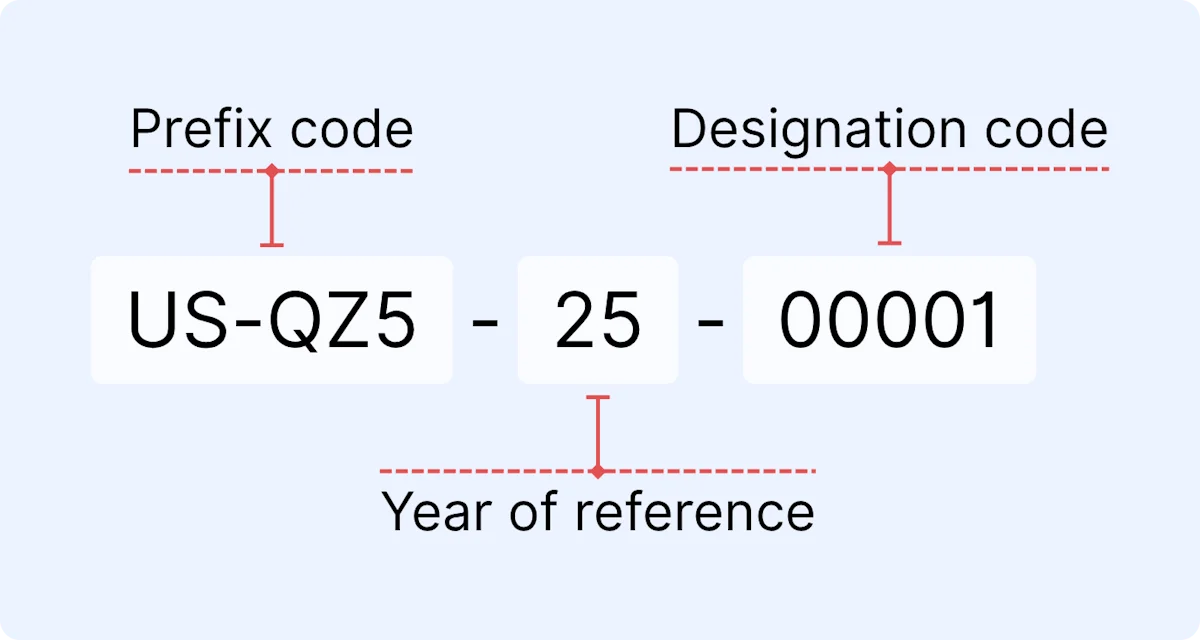
Every ISRC follows the same 12-character format: CC-XXX-YY-NNNNN
Here's what each part means:
CC (Country Code)
Two letters representing the country of the person or organisation that registered the code. For the UK, this is GB. For the US, it's typically US, QM, or QZ.
XXX (Registrant Code)
Three characters (letters and/or numbers) assigned to the individual or organisation that owns the rights to the recording. In the UK, PPL assigns these.
YY (Year of Reference)
The last two digits of the year the ISRC was assigned. This isn't necessarily the year the song was recorded or released, just when the code was allocated.
NNNNN (Designation Code)
A five-digit number assigned by the rights holder to identify the specific recording. PPL recommends numbering these sequentially by track listing. So the first track you register in a given year would be 00001, the second would be 00002, and so on.
A complete ISRC for a UK-based artist might look like this: GB-ABC-24-00001.
Once assigned, an ISRC is permanent. It stays with that recording forever, even if the rights are transferred to someone else.
ISRC vs UPC vs ISWC: What's the Difference?
These three codes get confused constantly, so here's the quick version:
- ISRC identifies an individual recording (one track).
- UPC (Universal Product Code) identifies a product (an album, EP, or single release as a whole). Think of the UPC as the barcode on the packaging and the ISRC as the fingerprint on each song inside it.
- ISWC (International Standard Musical Work Code) identifies the underlying composition. This is about the songwriting, not the recording.
If you release a single, the release has one UPC and the track has one ISRC. If you release an album with 10 tracks, the album has one UPC and each track has its own ISRC.
For a deeper dive into all the metadata you need locked in before release day, have a look at our Metadata 101 guide.
Why ISRC Codes Matter for Independent Artists
It's easy to treat ISRCs as just another box to tick during the upload process. But they're doing critical work behind the scenes.
How ISRCs Track Your Royalties
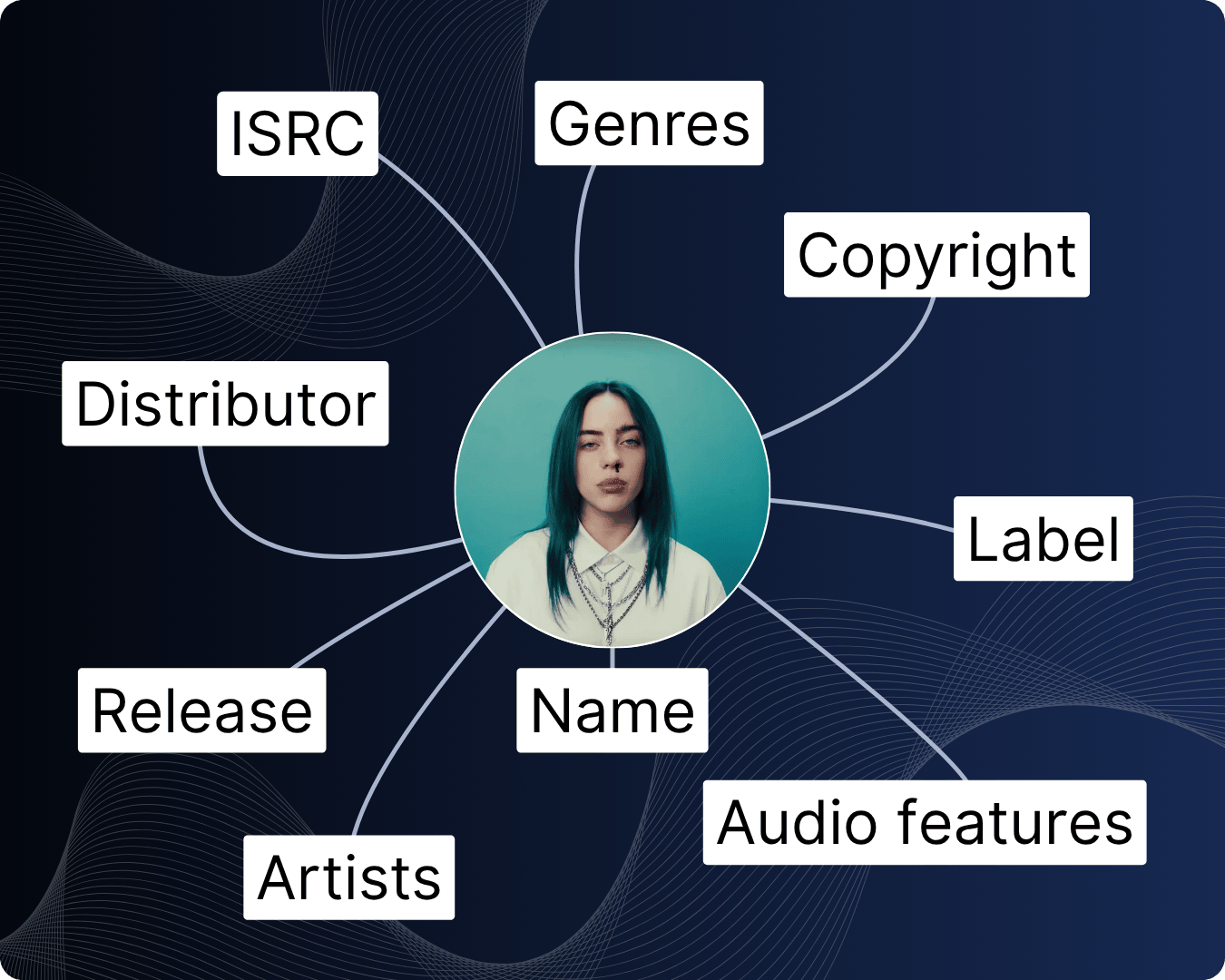
Every time your track is streamed on Spotify, played on radio, used in a TV sync, or downloaded from a store, the ISRC is what connects that play to you as the rights holder. Without it, there's no reliable way for royalty collection societies, distributors, or platforms to attribute that play correctly.
This matters even more when your music is played internationally. Collection societies across different countries use ISRCs to match recordings and distribute neighbouring rights payments. If your ISRC is missing or wrong, that money doesn't disappear. It just goes unclaimed, sitting in a pool that eventually gets redistributed to other artists.
Why Streaming Platforms Need Them
Spotify, Apple Music, Amazon Music, and every other DSP (Digital Service Provider) require a valid ISRC for every track delivered to them. Deliveries with missing, malformed, or duplicate codes get rejected.
Beyond just accepting your upload, platforms use ISRCs to deduplicate their catalogues, aggregate chart data, and power features like "song credits" and "appears on" sections. Billboard and the Official UK Charts also rely on ISRCs to aggregate sales and streaming numbers for chart eligibility. No valid ISRC, no chart placement.
How to Get an ISRC Code
There are two main routes, and for most independent artists, the first one is all you need.
Through Your Distributor (The Easy Route)
If you're using a digital distributor like DistroKid, TuneCore, CD Baby, Ditto, or any other major aggregator, they'll generate ISRCs automatically when you upload your release. It's free, instant, and built into the process.
You don't need to apply for anything separately. When your release is delivered to streaming platforms, the ISRCs are included in the metadata package. You can usually find your assigned ISRCs in your distributor's dashboard after upload.
This is the route most independent artists take, and it works perfectly well. The only thing to watch is that if you ever switch distributors, you need to carry your existing ISRCs with you. More on that in the common mistakes section below.
Through PPL in the UK
If you want your own registrant code so you can generate and manage ISRCs yourself, you can register with PPL (Phonographic Performance Limited), the UK's national ISRC agency.
When you join PPL as a recording rightsholder member, they'll assign you a unique three-character registrant code (the XXX part of the ISRC). From there, you can create your own ISRCs for every recording you own.
This route is more common for record labels or artists managing large catalogues who want full control over their code assignment. For a solo artist releasing singles, it's usually more effort than it's worth when your distributor already handles it.
That said, registering with PPL has another significant benefit beyond ISRCs: it's how you collect neighbouring rights royalties in the UK. These are separate from your streaming royalties and are paid out when your recordings are played on radio, TV, or in public spaces like shops and bars. If you haven't registered yet, you could be missing out on income. We've written a full guide on this: The un:hurd Guide to Neighbouring Rights.
Do ISRC Codes Cost Anything?
No. ISRCs are free. They're free through your distributor, and they're free through PPL when you register as a member.
If you come across any website charging you money for ISRC codes, walk away. There are third-party sites that sell ISRCs for a fee, but this is unnecessary and the codes you get from them are no different from what your distributor or PPL would give you at no cost.
Common ISRC Mistakes That Cost Artists Money
This is the section most ISRC guides skip, and it's arguably the most important. Getting an ISRC is easy. Getting it right is where artists trip up.
Danny Desai, Agency Director: "We've had artists come to us who've lost thousands of streams overnight because they switched distributors without carrying over their ISRCs. It's completely avoidable, but once it's done, it's really difficult to undo."
Reusing the Same ISRC for Different Versions
If you release an original version of a track and later put out a remix, an acoustic version, or a remastered version, each one needs its own unique ISRC. They're different recordings, even if the song is the same.
This sounds obvious, but it catches people out. If you reuse the same ISRC, streaming platforms can't distinguish between the two recordings. Plays get merged, royalty splits get confused, and untangling it after the fact is a headache nobody wants.
The rule is simple: same recording, same ISRC. New recording (even a minor remaster), new ISRC.
Losing Stream Counts When Switching Distributors
This is probably the most painful mistake an independent artist can make, and it's entirely avoidable.
When you switch from one distributor to another, your new distributor will ask you to upload your catalogue. If you don't provide your existing ISRCs during that upload, the new distributor will generate fresh ones. And because streaming platforms use ISRCs to identify tracks, your music will appear as a completely new release. Your existing stream counts, playlist placements, and "save" data can all be wiped.
Before you switch distributors, download or screenshot your ISRCs and UPCs for every release. Most distributor dashboards let you export this data. Then enter those exact codes when you re-upload through your new distributor. The metadata needs to match exactly. The same ISRC, the same UPC, the same track titles, and the same audio files.
Not Registering With PPL for Neighbouring Rights
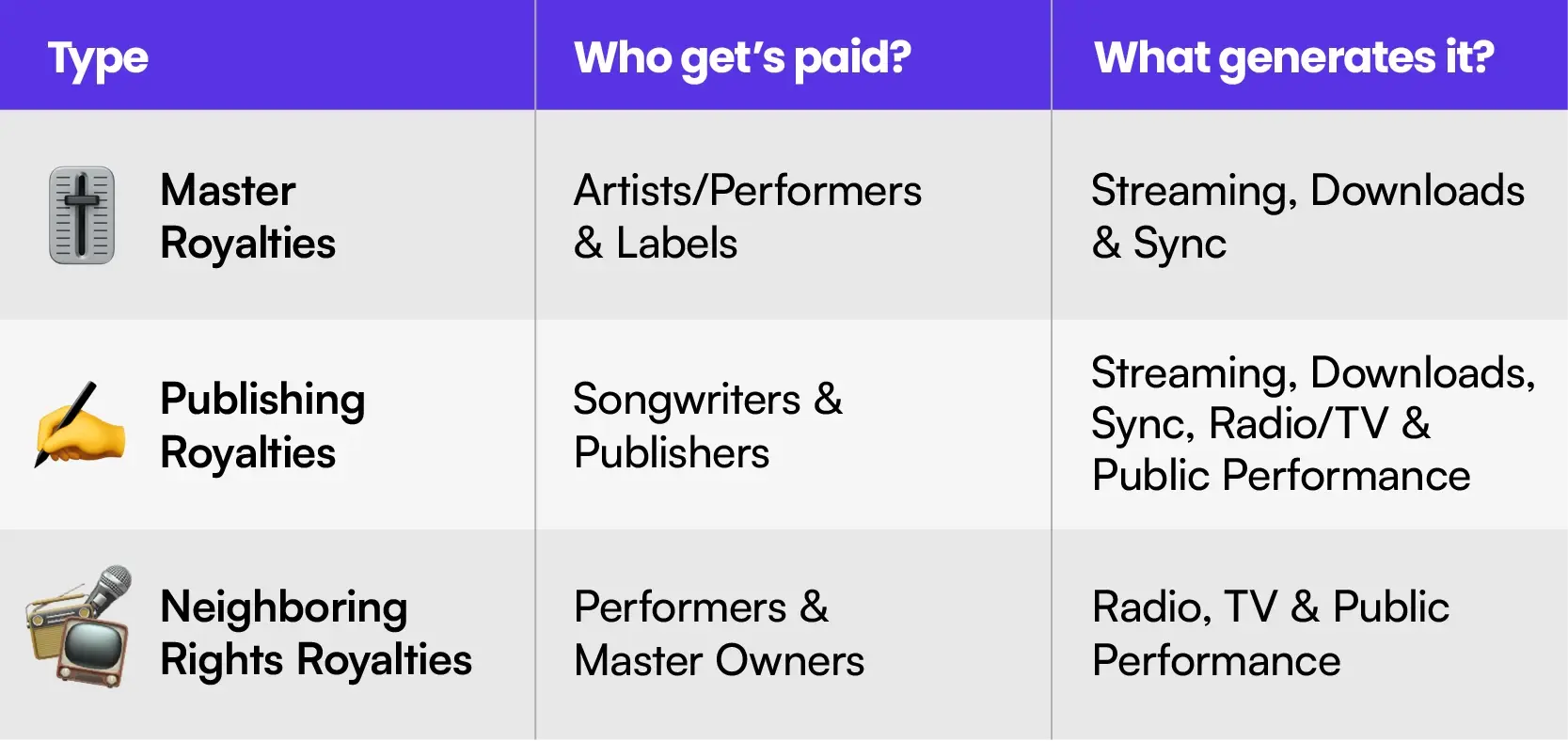
Your ISRC is tied to your recording, and PPL uses ISRCs to track when your recordings are played on UK radio, TV, and in public venues. If you haven't registered with PPL as a recording rightsholder, you're not collecting neighbouring rights income, even if your music is being played.
This is separate from your PRS membership (which covers songwriting royalties) and separate from what your distributor pays you (which covers streaming royalties). Neighbouring rights are an additional income stream that many independent artists don't even know exists.
How to Find an ISRC Code for an Existing Track
If you've already released music and need to look up your ISRCs, there are a few options:
Check your distributor's dashboard. Most distributors display ISRCs alongside each track in your release details. This is the most reliable source.
Use Spotify's metadata. While the Spotify app doesn't show ISRCs directly, tools like ISRC Finder (isrcfinder.com) or Soundcharts' ISRC Finder let you paste a Spotify track URL and retrieve the code instantly.
Check with PPL. If you registered your recordings with PPL, your ISRCs will be in your myPPL account under your catalogue.
Keep a record of your ISRCs somewhere safe (a simple spreadsheet works). You'll need them if you ever switch distributors, register with collection societies, or submit your music for sync licensing.
When Do You Need a New ISRC?
You need a new ISRC any time a new recording is created. That includes:
- A remix or re-arrangement of an existing track
- A live recording of a song you've already released in studio form
- A remastered version with audible changes to the audio
- A version recorded in a different language
- An edit (radio edit, extended mix) that's materially different from the original
You do not need a new ISRC if the same recording is simply released on a different platform, included on a compilation, or re-released under a different distributor (as long as the audio file is identical).
The golden rule: if the audio has changed, it's a new recording and needs a new ISRC. If the audio is identical, keep the same one.
Get Your Release Metadata Right From Day One
ISRCs are one piece of a bigger picture. Getting your metadata locked in properly before you release means your royalties are tracked correctly, your stream counts are protected, and you're not leaving money on the table.
If you're planning a release and want to make sure everything from your metadata to your marketing plan is sorted, set up a Release Cycle inside un:hurd. It maps out your full 8-week release roadmap so nothing gets missed. Start your free trial.