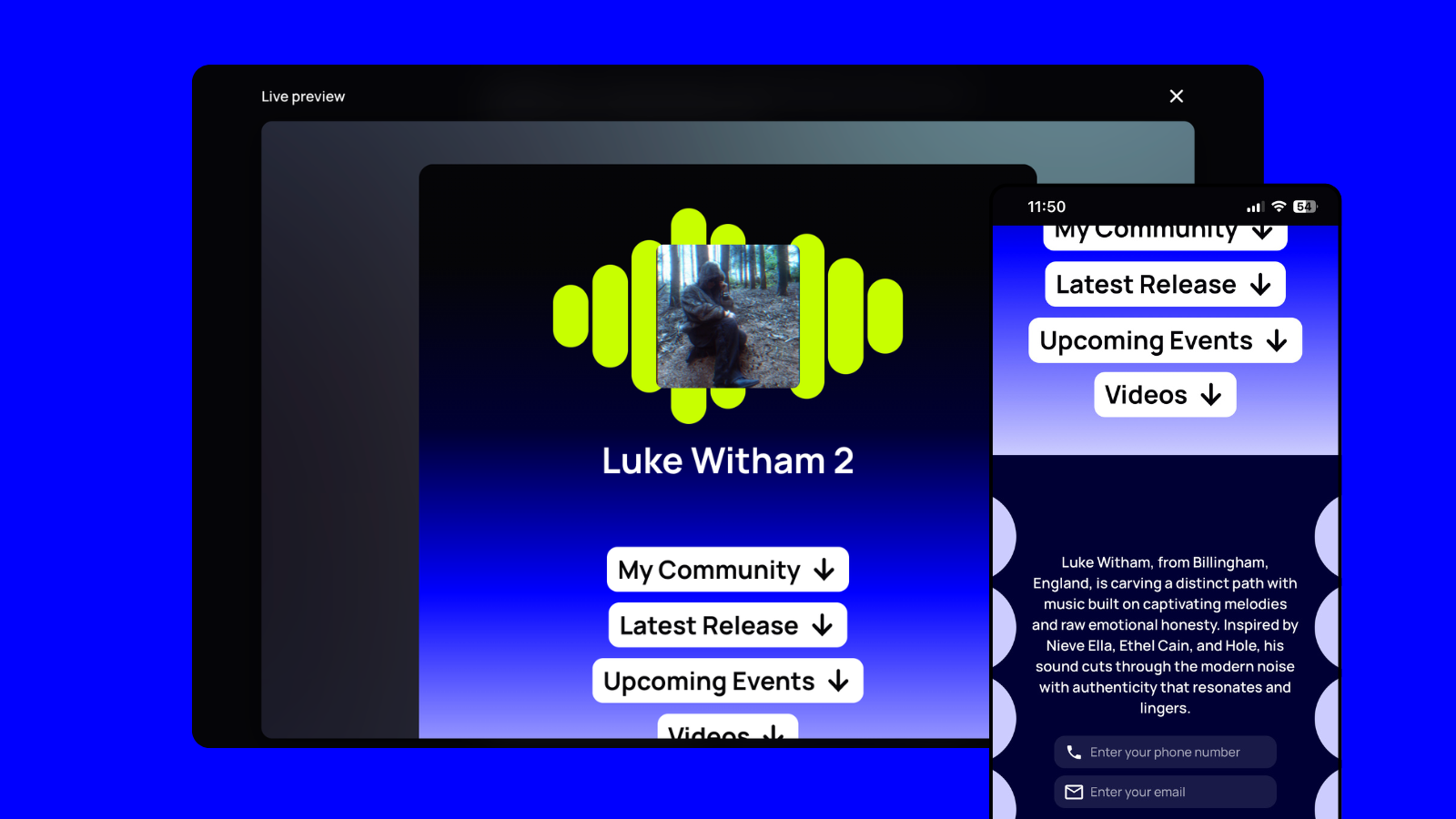
# Best Fan Capture and Music CRM Tools for Independent Artists ## TL;DR - **un:hurd Fan Hub, fan capture.** Best for busy artists who want one micro-site with exportable email and phone data, without building a website. - **Laylo, CRM.** Best for release or event drops that use email and SMS messaging. - **Linkfire, smart link.** Best for artists or small labels that need detailed link analytics across frequent releases. - **Feature.fm, pre-save.** Best for artists exploring release links and pre-save campaigns. - **Hypeddit, pre-save.** Best for campaigns that exchange downloads or other rewards for a fan action. - **ToneDen, smart link.** Best for artists running paid social campaigns alongside releases. - **Beacons, smart link.** Best for artists who want a general creator page covering music and their wider content. ## Why your links and your fan list need to work harder than they do Release attention fades quickly when every click ends on a streaming platform. A fan may listen once, enjoy the track, and disappear into an audience you can’t contact when your next release arrives. A basic smart link gives fans one URL for choosing Spotify, Apple Music, or another destination. A pre-save tool lets a fan authorise a track to enter their library on release day. Marketing platforms treat [pre-save pages as a separate format](https://blog.symphonic.com/2025/05/16/12-music-marketing-tools-every-independent-musician-should-use-2/) because they ask for a specific action before release. A fan-capture tool asks visitors to opt in with an email address or phone number. You gain a contact record, although each product sets its own rules for consent and exporting data. A full music CRM keeps those records across releases. It can group fans by their activity and support ongoing messages or automated campaigns. Choose the simplest level that gives you something useful to keep. For an artist balancing music with a day job, a feature-packed CRM can create more admin than value. Check how much setup and maintenance each tool needs, then confirm that you can export the contacts you collect. Useful reporting should help you decide what to do next. Visits, sign-ups, and release-level engagement can show which fans respond to a campaign. Follower counts provide broad reach figures, but identified contacts give you a practical way to continue the relationship. ## un:hurd Fan Hub ### Best for un:hurd Fan Hub best suits time-poor independent artists who want a polished home for their music and direct fan contact details without building a full website. ### What it is Fan Hub is a beautifully designed, mobile-friendly micro-site inside the wider un:hurd music platform. You can bring together streaming and social links, then add your biography and new-release information. The page can also feature community spaces, event links, fan sign-up options, and Buy Me a Coffee. An [11-step guided setup](https://www.unhurdmusic.com/blog/artist-fan-hub) helps you publish the page within a few minutes. You still need to gather your artwork, profile details, and destination links, but the builder removes the technical work. Twelve visual styles give the page a branded feel without requiring design skills. Fan Hub captures email addresses and phone numbers that you can export for use elsewhere. Exporting gives you a contact list you can keep rather than limiting your relationship to followers on a streaming or social platform. Fan Hub does not provide access to the identities of your streaming listeners. Basic analytics report Fan Hub visits and fan sign-ups. Those figures help you check whether release traffic turns into contact capture, although they do not provide advanced attribution or individual fan activity. Meta and TikTok pixel support lets you track visitors for advertising and retargeting campaigns. ### Pros - The guided builder gives you a credible artist page without website hosting or coding. - Exportable email addresses and phone numbers let you retain the contacts you collect. - Streaming destinations and social profiles share one home, while release and event information can sit alongside them. - Meta and TikTok pixels support retargeting when you run paid social campaigns. ### Cons - Fan Hub does not send marketing emails or automate follow-up messages. You will need a separate email platform to contact your exported list. - Analytics cover visits and sign-ups rather than detailed click attribution, fan scoring, or release-level behaviour. - The page requires some initial preparation because you need to supply your artist information and links. ### Pricing Fan Hub comes with the wider un:hurd subscription rather than as a separate product. Current paid pricing should be checked before subscribing. If you already want un:hurd’s broader release and promotion tools, the bundled model can reduce the number of separate services you manage. You can [try un:hurd](https://unhurdmusic.com) through its free trial before deciding whether the full subscription fits your release routine. ## Laylo ### Best for Laylo suits artists who want to collect email addresses and phone numbers around a specific release, ticket launch, or merch drop. The timed messaging works well when you need fans to act on one date. ### What it is Laylo creates a dedicated page for each drop. Fans register by email or SMS, and Laylo automatically messages them when the drop goes live. [Published product coverage](https://www.wheremusicsgoing.com/p/anonymous) also describes integrations with Spotify, Instagram, Shopify, and major ticket providers. The drop format requires less follow-up than collecting contacts in a form and messaging everyone manually. You can use Laylo’s CRM, while its public positioning says the fan data belongs to you. Exact export options need confirmation before you commit. ### Pros - Email and SMS capture lets fans choose how they hear from you. - Automatic drop-day messages reduce your campaign admin. - Separate pages help you connect each sign-up with a particular release or event. ### Cons - Laylo focuses on timed drops, so artists seeking an always-on music hub may need another tool. - Current contact limits and data-export details aren’t confirmed in the available material. - Detailed dashboard reporting also needs checking. A [2019 profile](https://www.builtinla.com/articles/laylo-connects-artists-superfans) described fan filters and engagement insights while the dashboard was still under construction. ### Pricing Laylo used monthly subscriptions in 2019, but the available sources don’t confirm current prices, plan limits, or a free tier. Check the live product and confirm SMS charges, contact allowances, and export access before signing up. ## Linkfire **Best for:** Artists and small labels managing several releases who need detailed streaming performance for each campaign link. **What it is:** Linkfire creates music smart links that send each fan to the right streaming service or store. Its release links can route listeners across [more than 250 platforms](https://alinkinbio.com/linkfire/pillar), including local versions for different countries. You can also build pre-save pages for Spotify and Apple Music. **Pros:** Linkfire gives you deeper link analytics than most basic smart-link tools. One independent review rates its per-link streaming insights highly, which helps you compare release campaigns without relying only on click totals. Linkfire also supports tracking parameters and device-based redirects, so artists running structured campaigns can separate traffic sources more clearly. The wide store coverage saves admin when you release internationally. Linkfire can automatically find platform destinations instead of making you add every regional link by hand. **Cons:** Linkfire’s [email collection remains fairly basic](https://www.payusnomind.info/blog/agg/item.php?id=605). Fan emails don’t feed into a native CRM or messaging tool, so you’ll need to export and manage them elsewhere. Its analytics also can’t show which traffic channel caused a specific stream. Page customisation may feel limited if your visual identity matters heavily. Linkfire also lacks a permanent free plan, which makes it harder to justify if you release occasionally or mainly want to start collecting contacts. **Pricing:** A third-party listing reports Pro at $27 per month, or $21 per month with annual billing, and Teams at $55 per month. Linkfire reportedly offers a 30-day trial rather than a permanent free tier. Check Linkfire’s live pricing before publishing or subscribing, since the available research doesn’t confirm those figures directly against its current pricing page. ## Feature.fm **Best for:** Artists comparing music smart-link and release-marketing platforms who can verify the current offer before committing. **What it is:** Feature.fm sits in the music smart-link and release-marketing category. Specific features, data-capture options, integrations, and analytics need verification before publication. **Pros:** Its music-focused positioning makes it worth considering alongside other specialist release tools. **Cons:** Available information doesn’t support a fair assessment of email export, pre-save tracking, ongoing fan management, or setup workload. **Pricing:** Verify current plans and limits directly with Feature.fm before use. ## Hypeddit **Best for:** Independent artists who want to exchange a download or pre-save opportunity for a follow or email address. **What it is:** Hypeddit sits in the pre-save and fan-capture category. Its gated pages ask fans to complete an action before accessing a reward. Industry marketing tools treat [pre-save and reward pages](https://blog.symphonic.com/2025/05/16/12-music-marketing-tools-every-independent-musician-should-use-2/) as distinct from standard release links because they collect an action or contact detail instead of simply routing a click. **Pros:** The exchange gives fans a clear reason to act, which can make sense for free downloads or release campaigns. You can collect something more useful than an anonymous page visit without building a separate website. **Cons:** Any gate adds friction, so some fans may leave rather than complete the requested action. An email address also needs somewhere useful to go. Check Hypeddit’s current export options and email integrations before relying on it as part of your wider fan-contact workflow. **Pricing:** Confirm current plans directly with Hypeddit before choosing it. Available research doesn’t verify its present pricing, platform integrations, or contact limits. ## ToneDen **Best for** ToneDen suits you if paid social already forms part of your release plan and you want smart links connected to ad retargeting. **What it is** ToneDen focuses on campaign pages that route listeners towards your music and support social advertising. You can use those pages as destinations for release ads, then build follow-up campaigns around audience activity. **Pros** ToneDen keeps your landing pages and paid social activity closer together. That connection can reduce the work involved in moving link visitors into retargeting campaigns. **Cons** Artists who mainly want to collect contact details and manage fan relationships may find ToneDen less suitable than a dedicated music CRM. Paid campaigns also require ongoing budget and attention, so the platform makes more sense when advertising already fits your routine. ToneDen’s current features and integrations need checking directly before you commit. In particular, confirm which streaming services, advertising platforms, and fan-data exports your chosen plan supports. **Pricing** Current pricing needs direct verification before use. Compare the available plan against your realistic advertising spend and release schedule. ## Beacons **Best for** Beacons may suit you if you already use it for wider creator content and want to keep your online presence in one place. **What it is** Treat Beacons as a general creator link-in-bio tool. The available research doesn’t confirm music-specific features, so don’t assume it supports DSP pre-saves, release-level fan tracking, or contact exports. **Pros** Keeping an existing Beacons page may save you some setup and ongoing admin. **Cons** Beacons’ email capture, analytics, audience export, and music integrations couldn’t be verified. You’ll need to check those details before relying on it for fan capture. **Pricing** Current plans, prices, and usage limits require verification before you choose a tier. ## How the tools compare at a glance Fan Hub offers the strongest starting point if you want a polished home for your music and exportable fan contacts without adding much admin. | Tool | Category | Best for | Fan data capture | Starting price | | --- | --- | --- | --- | --- | | un:hurd Fan Hub | Fan capture | Busy artists wanting one central micro-site | [Exportable email and phone details](https://www.unhurdmusic.com/blog/artist-fan-hub) | Included with wider subscription. Verify before use | | Laylo | CRM | Release and event drops with automatic messages | [Email and SMS](https://www.wheremusicsgoing.com/p/anonymous) | Verify before use | | Linkfire | Smart link and pre-save | Multiple releases needing detailed link analytics | [Basic email capture](https://www.payusnomind.info/blog/agg/item.php?id=605) | Verify before use | | Feature.fm | Smart link and pre-save | Artists running dedicated release campaigns | Verify before use | Verify before use | | Hypeddit | Pre-save and fan capture | Gated pre-save or reward campaigns | Verify before use | Verify before use | | ToneDen | Smart link | Artists pairing release links with paid social | Verify before use | Verify before use | | Beacons | Smart link | Artists combining music with wider creator content | Verify before use | Verify before use | ## Which one fits where you're at right now Start with a basic smart link if you mainly need one URL that sends listeners to their preferred streaming service. A pre-save page can support an upcoming release, but both options require little ongoing admin because they focus on a single fan action. They may leave you with click data rather than a reusable contact list. Choose fan capture when you’re ready to collect email addresses or phone numbers. You’ll need time to export those contacts, manage consent, and send useful updates through a separate email platform. A modest list you contact around genuine news can be more manageable than setting up complex automation. A fuller music CRM suits artists running several releases and campaigns who need to segment contacts or track engagement across them. Those features demand regular upkeep. If you can’t realistically maintain segments and messaging around a day job, a simpler tool will probably serve you better. [un:hurd Fan Hub](https://unhurdmusic.com) offers a practical starting point when you want one beautifully designed micro-site for your streaming and social links, release information, community options, event links, Buy Me a Coffee, and fan capture. Fan Hub captures and exports email addresses and phone numbers, and it reports visits and sign-ups. It comes with the wider un:hurd subscription and does not send email marketing, so you’ll still need another service when you’re ready to contact your list. The free trial lets you test whether the setup fits your routine before committing. ## Common questions about fan capture and music CRM tools **What’s the difference between a music CRM and a smart link?** A smart link sends fans to their preferred streaming service or another destination. A music CRM keeps persistent fan records and may add segmentation, campaign history, and direct messaging. Fan-capture tools sit between those categories by collecting contact details without necessarily helping you manage or message them. Vendors generally treat release pages, pre-saves, and email-capture pages as [separate tools](https://blog.symphonic.com/2025/05/16/12-music-marketing-tools-every-independent-musician-should-use-2/). **How does pre-save tracking work, and what data do I get?** A pre-save asks a fan to authorise an action on a streaming platform before release day. Your tool may report page visits, clicks, authorisations, or completed saves, depending on its platform permissions. Check which event each metric represents. A click doesn’t always confirm a completed pre-save, and you won’t automatically receive every fan’s email address. **Do I own the fan emails I collect?** You can use and move contact data when your tool allows exports and the fan has agreed to hear from you. Fan Hub lets you [export collected email addresses and phone numbers](https://www.unhurdmusic.com/blog/artist-fan-hub), which gives you a usable contact list outside the platform. Your access doesn’t extend to anonymous streaming listeners, and you remain responsible for consent and unsubscribe requests. **How can I track which fans engaged with a specific release?** Use a separate capture or drop page for each release and connect each sign-up to that campaign. Laylo supports release-specific drop pages with email or SMS registration and scheduled messages for the drop date, according to [Where Music’s Going](https://www.wheremusicsgoing.com/p/anonymous). Fan Hub reports visits and sign-ups, but it doesn’t currently provide contact-level release behaviour. Anonymous smart-link clicks can show interest without identifying the individual fan. **Do I need a CRM when I’m starting out?** You probably don’t need a full CRM before you have contacts to manage. Start with one clear destination that collects exportable details without creating weekly admin. Fan Hub suits this stage because it combines your release, social, community, and event links with email and phone capture. You’ll need a separate email platform when you’re ready to message those contacts.