How to Run Facebook and Instagram Ads for Your Music Without Your Own Ad Account
Run Facebook and Instagram ads for your music without a Meta ad account. Connect your Facebook Page, pick a goal and launch from $100 with the social ad tool.
By Sam Blackie, Head of Growth at un:hurd music
Last updated: 12 October 2026
Key Takeaways
- You can run Facebook and Instagram ads for your music through un:hurd music's social ad tool without setting up a Meta Business Manager, an ad account or a payment method in Meta. You connect your Facebook Page to un:hurd and un:hurd runs the campaign.
- To run Meta ads through un:hurd, you need administrator access to your own or your artist's Facebook Page, so you can share advertising access with un:hurd. Your ads can run in Facebook and Instagram feeds, Stories and Reels.
- In the social ad tool you choose a goal (a video, your music, a social media profile, an event or a custom page) and then an objective: streams, Spotify visibility and placements, engagement, followers or pre-saves.
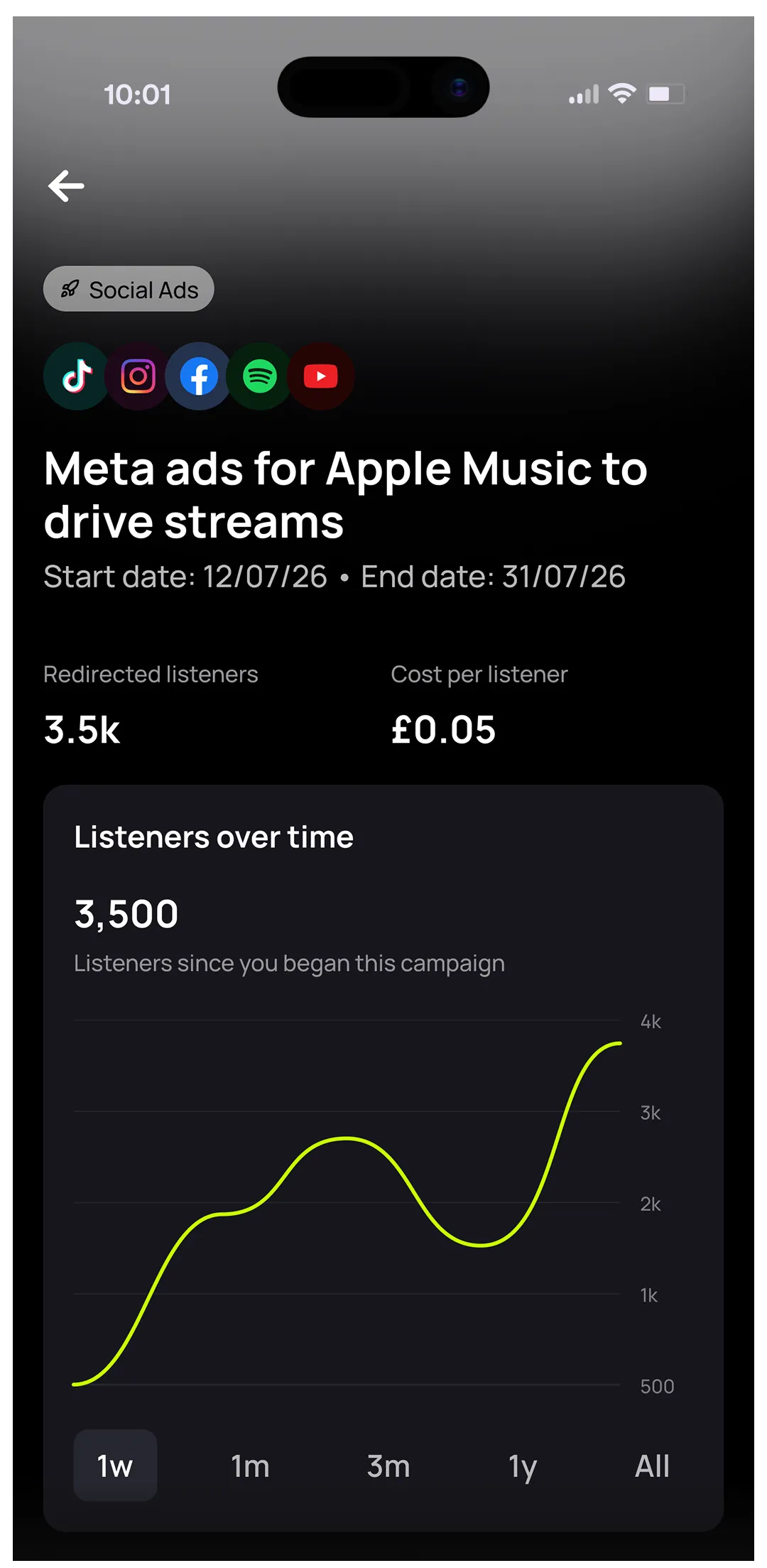
- Social ad tool campaigns have a minimum budget of $100, converted to your local currency at checkout, and un:hurd charges an ad fee of 20% of your ad spend. The Campaigns tab in un:hurd shows each ad's dates, budget spent, results and cost per result.
You don't need your own Meta ad account to run Facebook and Instagram ads for your music. un:hurd music's social ad tool builds and runs the campaign for you: you connect your Facebook Page, choose what to promote and what you want people to do, and un:hurd handles the ad setup and targeting. The same tool runs campaigns on Spotify, TikTok and YouTube, so a Meta ad can sit alongside ads on other platforms for the same release.
Earlier versions of this guide walked you through creating a Facebook Page ad account, a Business Manager and a payment method in Meta before you could run anything. You can skip all of that now.
What you need before you start
To run Facebook and Instagram ads through un:hurd, you need a Facebook Page for your music, something to promote and a budget of at least $100.
The Facebook Page is the only page you need to connect for Meta ads. You must have administrator access to it, whether it's your own Page or one belonging to an artist you work with, so you can share advertising access with un:hurd. If you manage ads for another artist, ask them to make you an administrator of their Page first.
You can't connect your own Meta ad account to the social ad tool. un:hurd built it that way so artists can get an ad live with as little setup as possible.
How to set up a Facebook and Instagram campaign in the social ad tool
Booking a Meta campaign follows the same steps as any other platform in the social ad tool:
- Choose your goal, which is what the ad points people to. That can be a video, your music, a social media profile, an event or a custom page.
- Choose your objective, which is what you want people to do once they see the ad. The options are streams, Spotify visibility and placements, engagement, followers and pre-saves.
- Add your creative and check the targeting.
- Set your budget and launch. Campaigns have a minimum budget of $100. Budgets are priced in US dollars and converted to your local currency at checkout, and un:hurd charges an ad fee of 20% of your ad spend.
.webp)
On Meta, your ads can run in Facebook and Instagram feeds, Stories and Reels.
un:hurd sets the targeting from your own data, which is the right place to start if you haven't run music ads before. If you want more control, open advanced targeting to choose your own locations, including cities Smart Insights has flagged for you.
For a full walkthrough with screenshots, see the help centre guide on how to use the un:hurd Ad Builder.
Tracking your Facebook and Instagram ads in the Campaigns tab
Once your Meta ad is running, you can track it in the Campaigns tab in un:hurd. The tab lists each ad with its start and end dates, budget spent, number of results and cost per result. Each campaign also has a full report, which un:hurd links to by email.
When running Meta Ads Manager yourself still makes sense
Running ads yourself in Meta Ads Manager gives you every setting Meta offers, and you pay Meta directly without un:hurd's 20% ad fee. If you already run ads for other projects and like adjusting campaigns day to day, that control can be worth having.
The trade-off is the setup and the learning curve. You'll need a Business Manager, an ad account and a payment method in Meta, and then you have to work out which objectives and settings suit a music campaign. Sam Blackie, Head of Growth at un:hurd music, puts it this way: “Ads managers are built for experienced marketers rather than artists, so the learning curve is huge. The platform is also trying to make as much money as it can, so its suggestions aren't always in the ad booker's interest. Add the need to drive towards actions like clicks on smart links and engagement on posts, rather than just views and clicks, and it's too much for an artist who's already juggling too many hats.”


If you'd rather spend that time on the music, the social ad tool gets a Meta ad live without any of it.
Getting your Facebook Page and Instagram ready before you promote
The ad can only be as good as the post and the profile behind it. This advice works whether or not you use un:hurd:
- Promote a post that's already picking up likes, comments and shares without any spend. People have already shown they like it, so paying to show it to more of them is a safer bet than promoting something untested.
- Get to the music quickly. Open on the hook of the track or your strongest visual, because people scroll past feed posts, Stories and Reels within seconds.
- Make sure your Facebook Page and Instagram profile both have recent posts, a current profile picture and a link to your latest release, so people who tap through from the ad find a reason to follow.
- Check you still have administrator access to your Facebook Page before release week, so sharing advertising access doesn't hold up your launch.
If you're building a list of fans you can contact directly, you can also point a Meta ad at your Fan Hub by choosing custom page as the goal. Our guide to building a direct-to-fan marketing strategy explains how that fits together.
The short version
You can run Facebook and Instagram ads for your music without a Meta ad account, Business Manager or payment method set up in Meta by booking them through un:hurd's social ad tool. You need administrator access to a Facebook Page, which you connect to un:hurd, and a budget from $100. You pick a goal and an objective such as streams, followers or pre-saves, un:hurd sets the targeting from your data, and your ads run across Facebook and Instagram feeds, Stories and Reels. Results show up in the Campaigns tab.
If you've got a post that's already doing well on Facebook or Instagram, set up a Meta campaign for it in the Social Ads tab in un:hurd and let un:hurd handle the setup. If you get stuck, message live chat in the app, where you can ask Woody or speak to the un:hurd team.
For more on running ads across platforms, read our guide to running TikTok ads for your music without your own ad account and our guide to using automated music marketing tools for your release strategy.
About the author
Sam Blackie is Head of Growth at un:hurd music and has worked on artist ad strategy.